Addy
Addy  Addly
Addly  Goalify
  Monet
Monet  Reviso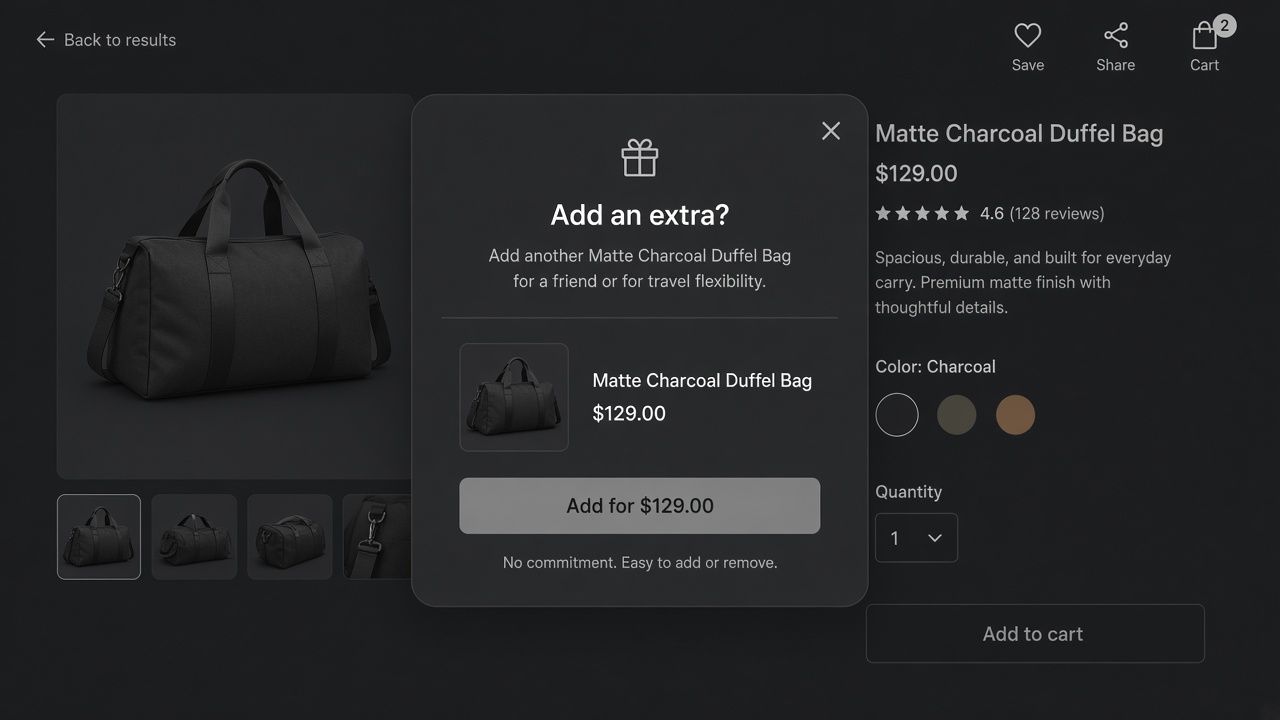
Key takeaways
- A pre-purchase upsell asks before the order is placed. A thank-you page offer is a second order, not this.
- The honest moments are add to cart, the start of checkout, and a shopper who is about to leave. A timer on a browser is none of those.
- Monet is those three moments. Bundle, cross-sell or add-on, with a real discount. No email field. No A/B test.
- One offer. Ten examples below are patterns, not a stack you should run together.
A pre-purchase upsell is an extra item offered before the shopper pays. It joins the order already in progress. A thank-you page offer is a new order, after the decision, and it is a different product. Stores buy a "pre-purchase" app and then fire a popup on a timer while the shopper is still reading. That is an interruption. It is not an upsell.
Monet waits for three moments: add to cart, checkout starting, and a shopper about to leave. The offer can be a bundle, a cross-sell or an add-on, with a real discount, including a quantity break or a buy-one-get-one when the deadline or the rule is real. Recommendations can come from orders you have already taken. Country and customer tag decide who sees it. It is free. It does not collect email addresses. It does not A/B test. It does not sit on the thank-you page.
These ten are examples of offers, not case studies and not a stack.
| Example | When it asks | Why it is pre-purchase |
|---|---|---|
| Case for the device just added | Add to cart | The accessory only makes sense with that device |
| Travel size of the moisturiser | Add to cart | A smaller second unit, not a second routine |
| Refill pouch beside the bottle | Add to cart | Same product, cheaper format, one decision |
| Two-pack at a quantity break | Add to cart | The second unit is the offer, before they leave the product |
| Gift wrap or a pouch | Add to cart | A fee they can see, not a line that appears later |
| The matching shade | Checkout starts | They are committed, the pair is still optional |
| A sample set of the scent they bought | Checkout starts | One small add, then payment |
| Free-shipping closer | The cart is short of the bar | One product that crosses the line, not a grid |
| A cheaper variant when they are leaving | Exit | A real alternative, not a coupon for the same item |
| The add-on they removed | Exit | One chance to put it back, then stop |
What the popup is allowed to say
One product. A price that matches checkout, because the discount is a Shopify discount. A reason that names the item already in the cart. If you need a countdown, the end time has to be a real end. A timer that resets is the failure mode in exit-intent popups. Monet can show a countdown when the deadline is real.
Do not also pop the same product inside the cart drawer. Addy is the in-cart version of one complement. Pick the surface. Product-page sets and quantity breaks still belong to Addly, not to a popup that restates the product page.
What to skip
A browse timer. An email capture. A second popup after they declined. A thank-you upsell described as pre-purchase. A discount so deep the first item was the bait. None of those are in the ten.
Three of the ten, with prices
These are setups, not case studies. Swap in your SKUs and your cost.
The case, after add to cart. The phone is $499. The case is $29 and costs you $6. The popup names the phone they just added and offers the case once. There is no percentage off, because $29 next to $499 does not need a costume. If you do discount it, 10% is $2.90, and you still have margin. Forty percent off, to $17.40, is a different product. Do that only if the case is how you acquire the customer, and write the margin down first. Monet shows one product at this moment. Country or a customer tag can hide it from wholesale.
The refill, after add to cart. The bottle is $24. The pouch is $16, and the pouch is the same formula. The popup says the pouch is the format that lasts longer per dollar. This offer belongs here because the shopper just chose the product. It does not belong on a collection page they are still browsing. A quantity break on the bottle itself is a product-page job for Addly. The popup should not restate a tier the page already showed.
The closer, when the cart is short. The bar says $14 to free shipping. One product in the catalogue costs $16 and is something this shopper has a reason to want, because other orders with the same first item included it. The popup offers that one product. It does not offer a grid. If nothing in the catalogue honestly closes a $14 gap, do not invent a $4 sample with free shipping attached. Move the threshold, or leave the gap on the bar. Goalify can name a product from your orders when the cart is short of a goal. Use one of those systems, not both, for the same gap.
Which moment gets which offer
| Moment | The shopper has | A fair ask | A poor ask |
|---|---|---|---|
| Add to cart | Chosen a product | The thing that completes it | A newsletter, a timer, a second unrelated brand |
| Checkout starting | Decided to pay | One small add, then payment | A bundle that forces them to rethink the order |
| Exit | Signalled they are leaving | One cheaper format, once | A coupon that trains them to leave |
| Still reading | Not chosen | Nothing | Any popup |
Exit on a phone is a weak signal. Prefer add to cart there. The detail is in exit-intent popups. Checkout offers are easy to overbuild. One line, one button, a way to dismiss that is as obvious as the add. Checkout initiation is the narrower version of that moment.
A countdown belongs only when the end is real. A code that dies at midnight can show a clock. A clock that resets on refresh is a false statement about the offer. Monet can show the clock when the deadline is real. It will not collect an email address in the same popup. The email ask is how the upsell becomes a form.
Pick one, then count it
Choose the example that matches the product you already sell most. Ship that popup. For a week, count three things from your own orders.
- Popups shown.
- Adds from the popup.
- Orders where the original item and the extra item both stayed through payment.
You do not need an industry attach rate to judge it. If the extra item is removed before payment, the discount was the bait or the product was wrong. If almost nobody adds, the moment is wrong, or the product page already made the offer. Turn the popup off before you add a second one.
Do not also show that SKU in the Addy drawer. One surface. Recommendations can come from purchase patterns, and you can still pin a SKU for a campaign. Pin the campaign. Let the pattern fill the days the campaign is off.
Wholesale and staff tags should not see the consumer offer. Monet can target by customer tag and by country. A 10% case offer on a wholesale account that already has contract pricing is how the price list leaks into a popup. Exclude the tag. Check it with a tagged customer, not only with a fresh incognito session. A fresh session only proves the offer works for a stranger. Log in as the tagged wholesale customer and add the same product. The popup should stay closed. If it opens, the tag rule is not the rule you think it is.
Install Monet for the ask. The popup comparison is in best Shopify upsell popup apps.
Frequently asked questions
What is a pre-purchase upsell?
An offer shown before the shopper pays, so the extra item joins the order they are already placing. Post-purchase and thank-you offers are a later order.
Where should it appear?
After add to cart, when checkout starts, or on exit. Not on a timer while someone is still reading the product page.
Is a cart drawer upsell pre-purchase?
Yes. The shopper has not paid. Addy shows that one inside the drawer. Monet shows it as a popup at add, checkout or exit. Use one surface for one product, not both for the same product.
Can I capture an email in the same popup?
Not in Monet. The popup is the offer. An email field is a second ask, and it is how the upsell starts losing to a newsletter.
Do the ten examples need ten popups?
No. Pick the one that matches the product already in the cart. The list is a menu, not a campaign plan.
How deep should the discount be?
Deep enough to notice, shallow enough that the extra unit still has margin. A worked pair is in the article. Use your cost, not a benchmark.
What if they close the popup?
They said no. A second popup in the same session repeats the ask. Leave the offer in the cart if it still belongs there, or let them go.