Addy
Addy  Addly
Addly  Goalify
  Monet
Monet  Reviso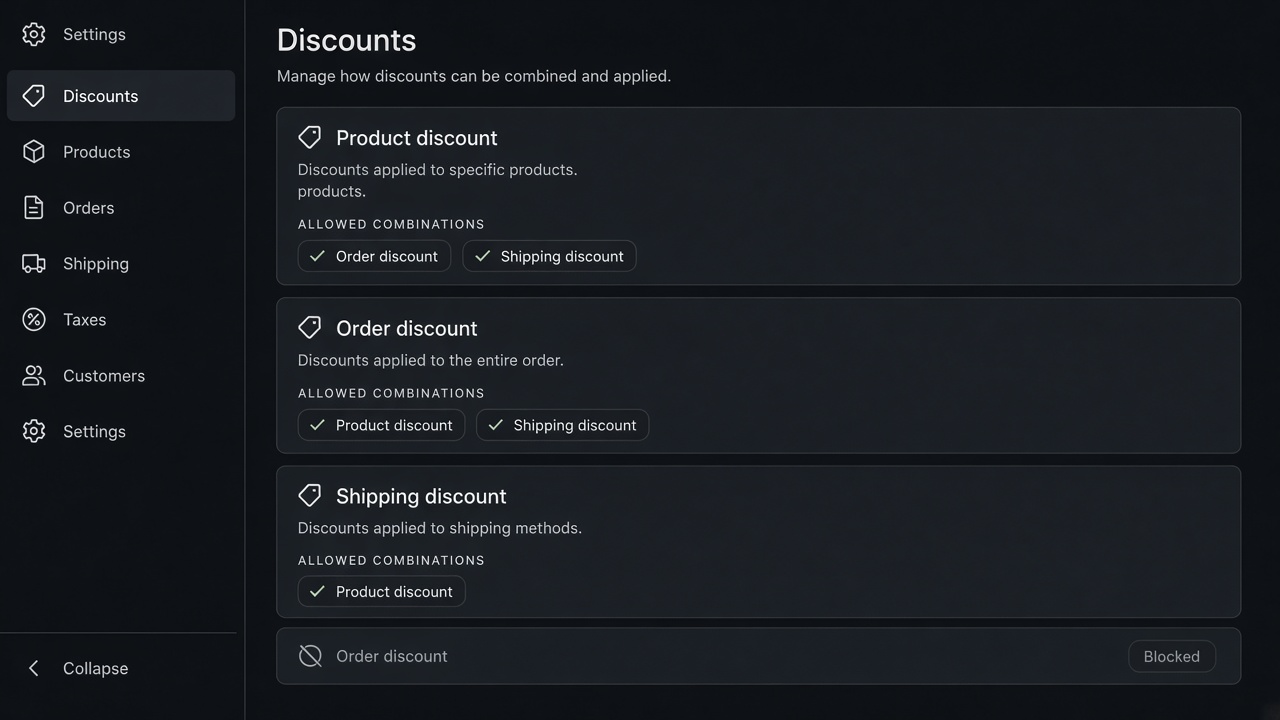
Key takeaways
- Shopify stacks discounts only when each discount allows the combination. The checkbox is the rule, not the theme.
- Product, order and shipping discounts are different stacks. Two product discounts on the same unit usually should not both apply.
- A bundle app that writes its own price, beside a Shopify discount, is how the cart and the product page disagree.
- Addly uses Shopify's own discounts, so the combination settings you already understand still apply.
Discount stacking on Shopify is not a theme setting. Each discount, automatic or code, has combination rules: it may combine with product discounts, order discounts, and shipping discounts. If either side refuses the pair, checkout keeps one of them. The shopper sees a code that "does not work" and assumes the store is broken.
The three stacks
| You are discounting | Examples | Usually combines with |
|---|---|---|
| A product | Bundle price, quantity break, 15% off one SKU | Shipping, sometimes an order discount. Rarely a second product discount on the same unit |
| The order | 10% off the cart, a threshold reward | Product discounts and shipping, if both sides allow it |
| Shipping | Free shipping over a threshold | Product and order discounts, if the shipping discount allows it |
Read that as a permission, not a promise. Both discounts must allow the combination. A bundle that allows order discounts, and a code that does not allow product discounts, still will not stack.
What you actually want to stack
A set or a quantity break should stack with free shipping. The shopper who built the bundle is the shopper the bar is trying to move. Blocking shipping on a bundled cart makes the progress bar a lie.
A set should not stack with a second product discount on the same units. The bundle price is already the offer. A 20% code on top is a second offer you did not merchandise. Turn that combination off unless finance has already priced it. The check is in bundle discount maths.
An order-level reward, such as 10% off once the cart clears a goal, can sit on top of a product bundle if both discounts allow it. That is a real stack. Write it down. "Bundle price, then 10% off the order, then free shipping" is a sentence finance can audit. Three apps that each think they own the line is not.
Where the price should be created
Addly creates the bundle, the pair, the quantity break and the add-on as Shopify discounts. The product page and the checkout read the same discount. You still set Combinations in Shopify. You do not debug a private price the theme cannot see.
If a code and a bundle fight, do not add a third app to "fix stacking". Open the two discounts. Decide which combination is allowed. Publish that, and only that.
Goalify can own the shipping threshold and an order-level reward. Let it combine with the product discount. A second free-shipping discount, built by hand with the opposite combination checkbox, will fight the first one at checkout.
A cart you can audit
Fill this with your own cost. The prices are an example.
Two products list at $40 and $30, so $70 together. The set is 15% off those units, which is $10.50. The pair is $59.50. That 15% is a product discount, created as a Shopify discount by Addly.
An order code of 10%, allowed to combine with product discounts, applies to what is left. Ten percent of $59.50 is $5.95. The merchandise total is $53.55. Free shipping then depends on the shipping discount allowing both product and order discounts, and on whether $53.55 still clears the minimum. If the minimum is $75 on the purchase amount after discounts, this cart does not get free shipping. The bar has to say so. A bar that still says "free shipping unlocked" is using a different subtotal from checkout.
If the 10% code is not allowed to combine with product discounts, checkout keeps one discount. The shopper sees a code that "does not work". That is the checkbox, on one side or the other. Both discounts have to allow the pair.
The stack you probably do not want
The same $70 pair, plus a sitewide 20% that also targets those units. Twenty percent of $70 is $14. Together with the $10.50 bundle, that is $24.50 off $70, before any order code. If the two units cost you $32 to land, you have $13.50 left, and you have not paid the label yet.
That is why two product discounts on the same unit are usually a mistake. The bundle price was already the offer. The sitewide sale can be a choice the shopper gets instead, or it can exclude the bundled SKUs. Run the exclusion in the discount, where checkout can see it. A theme that hides the sale badge and still lets the code through has only hidden the problem.
A quantity break is the same shape. One unit at $28, two at $48. The break is already $4 off each unit. A further 20% on the $48 makes $38.40. Write that down before you turn Combinations on. The worksheet for the margin is in bundle discount maths.
Automatic discounts and codes
An automatic discount applies when the cart qualifies. A code applies when someone types it. They still use the same combination rules. Automatic does not mean "stacks with everything". A code does not mean "the customer earned a second cut".
Shopify will not apply a pair that either discount refuses. You do not need a third app to referee that. You need a written sentence:
| Stack you intend | Product discount | Order discount | Shipping discount |
|---|---|---|---|
| Bundle, and free shipping if the cart still qualifies | The set | Off | On, if the minimum is still met |
| Bundle, then 10% off the order, then shipping | The set | The 10% code | On, if the minimum is still met |
| A sitewide sale instead of the bundle | One of them, not both on the same units | Whatever the sale already includes | On, if you still want shipping |
| Quantity break only | The break | Off for that SKU | On |
Read checkout after each row. The product page, the cart, and the payment step should show the same merchandise total. Addly is how the bundle, the pair, the quantity break and the add-on become that Shopify discount. A widget that paints a lower price on the product page, while checkout uses a different engine, is the drift people call a stacking bug.
What changed when the code landed
A common support ticket is "they had free shipping in the cart and paid for shipping". Walk the cart in order.
- Merchandise before discounts.
- Product discounts, including the bundle.
- Order discounts, if they are allowed.
- The purchase amount Shopify uses for the shipping minimum.
- The shipping discount, if that amount still qualifies and the rate is one the discount covers.
Express excluded from the discount will still charge, even when the bar says shipping is free. Name the rate. "Free standard shipping over $75" is a sentence. "Free shipping" is a hope.
Place four test orders before a sale: no code, code that should stack, code that should not, and a code that pulls the cart back under the shipping minimum. Save the four totals. If a later app changes a combination checkbox, you will see which total moved.
Write the four totals on the sale calendar, next to the end date of the promotion. When the sale ends, the sitewide discount has to come off the combinations you allowed for the week. A forgotten automatic discount is how Tuesday still has Friday's stack. Addly can stay. The temporary code should not. Open one order from the sale in admin and read the discount lines. The names there should match the sentence you wrote down. If a third name appears, an app you forgot is still discounting the unit.
Install Addly when the bundle should be a Shopify discount you can combine on purpose.
Frequently asked questions
Why won't my Shopify discounts stack?
Open each discount and check Combinations. A code that is not allowed to combine with product discounts will lose to the bundle, or the bundle will lose to the code. Both outcomes look like a bug. Both are the checkbox.
Can a customer use a code on top of a bundle?
Only if the bundle discount and the code are both allowed to combine. If you do not want a second cut, turn the combination off. Do not hope the theme will block it.
Do free shipping discounts stack with product discounts?
They can. Shipping is its own combination. A product bundle and a free-shipping threshold should be allowed to combine, or the bar will promise shipping the checkout then removes.
Should quantity breaks stack with a sitewide sale?
Usually no. A 20% sale plus a quantity break on the same unit is a deeper cut than the margin planned. Leave the sale and the break as a choice, not a stack.
What if two apps both discount the same line?
Pick one app to own the price. Addly is that app for sets, pairs and quantity breaks. A second discount engine on the same SKU is the drift.
Which discount does checkout keep when they cannot combine?
One of them. The shopper experiences that as a code that failed. Open Combinations on both discounts and decide the pair on purpose, then place a test order.
Does a code change whether the cart still qualifies for free shipping?
It can. A 15% code on a $78 cart can drop the purchase under a $75 shipping minimum. Test the code and the threshold together.