Addy
Addy  Addly
Addly  Goalify
  Monet
Monet  Reviso
Key takeaways
- Turbo Progress Bar is a cart bar for a visible reward.
- Goalify stacks free shipping, a discount and a gift, and can change the threshold by country.
- Suggestions aim at the gap, and the bar can sit outside the cart as well.
Turbo Progress Bar is a fast cart bar: show the goal, fill it, get the shopper to add something. Goalify is built for stores that run more than one goal at a time, and for stores where the domestic minimum and the export minimum are not the same number.
A visible bar is table stakes. The content of the goal is the strategy. Free shipping is the reward most stores reach for first, because shoppers already understand it. The gift and the discount you already emailed are the rewards the bar should be able to say next.
One bar, a sequence of rewards
Turbo-style bars optimise for a lightweight progress indicator. The cart should feel closer to a reward after every add. That feeling is correct. Shipping-only bars leave money on the table when the brand also has a gift at a higher threshold, or a discount that should appear before the gift.
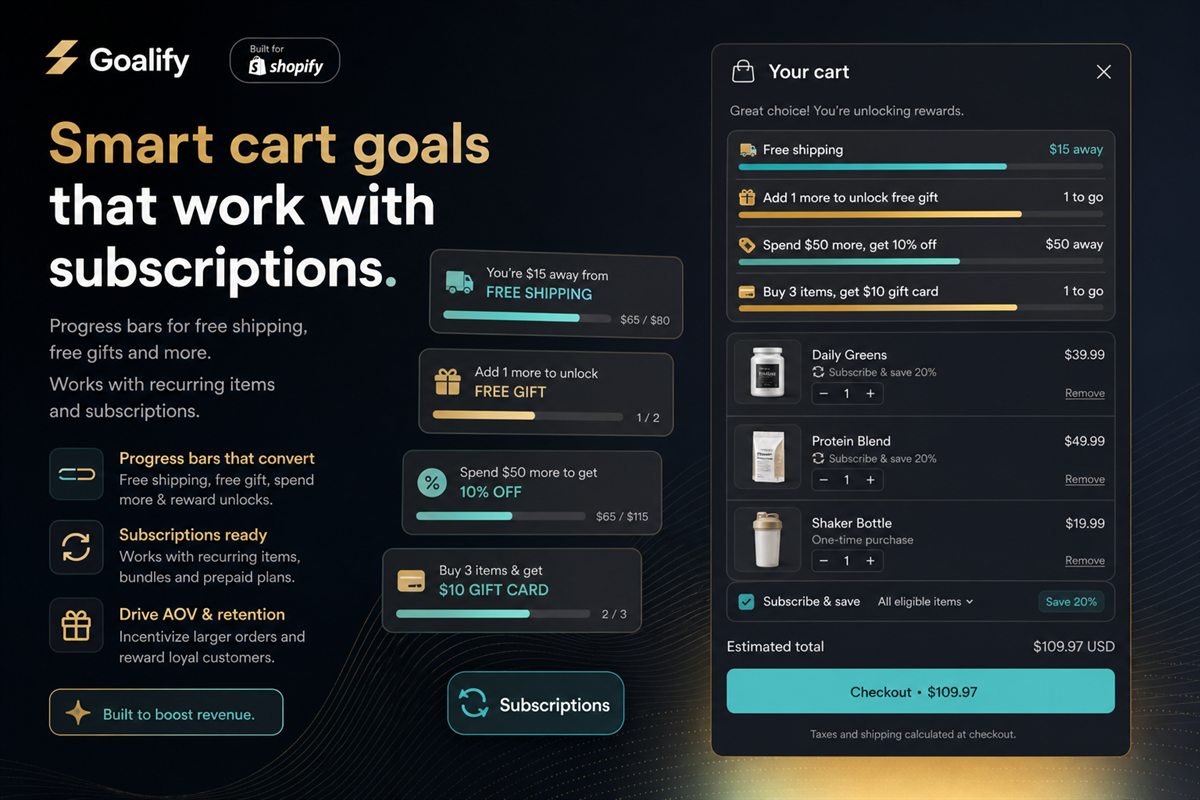
Goalify stacks free shipping, an order discount and a free gift in one programme. Qualify by cart value, by quantity, or by specific products. Gift rules can follow what was bought, including a buy-one-get-one style reward. When the shopper is short, suggestions from order history aim at the remaining amount. The product is chosen to finish the goal.
The bar can sit in the cart and as a block on the product page or the header. You can test a threshold. Analytics show whether the new number earned the change.
A $50 domestic goal and a $120 export goal can both be true. Goalify keeps a threshold per country, so an international cart is not judged by the home minimum. The message stays short. Shoppers do not read a paragraph inside a thin bar. They read the next reward.
Free under 10 orders a month, then $3.99, $7.99 and $11.99. Built for Shopify, 5.0 from 42 reviews.
Goalify and Turbo
| Feature | Goalify | Turbo |
|---|---|---|
| Rewards in one bar | Free shipping, then an order discount, then a gift | Free shipping, gifts and discounts |
| What they should add | The product from your orders that closes the remaining amount | Not included |
| Countries | A different threshold per country | Not included |
| Tests | Compare thresholds and copy, with analytics | Not included |
| Rules | Cart value, quantity, or specific products and collections | A live bar on the cart, the drawer and the product page |
| Gift behaviour | Auto-add, with control over which products qualify | Gifts auto-add |
Set the sequence before you set the colour
Pick Goalify when the promotion calendar has more than one reward, or more than one country. Write the order down: shipping, then the discount, then the gift. Test one threshold change at a time. The colour of the bar is the last decision, and the least important one.
Set the sequence with the progress bar guide. If the cart is a drawer, the goal still belongs next to the line items in Addy.
Frequently asked questions
How does Goalify compare with Turbo Progress Bar?
Both draw a reward bar. Goalify lets you stack shipping, discount and gift goals, set rules by value, quantity or product, and suggest items from order history to close the gap.
Can I put the bar on a product page?
Yes. Goalify ships as a cart bar and as a block you can place elsewhere on the theme.
What does Goalify cost?
Free up to 10 orders a month. Paid plans are $3.99, $7.99 and $11.99. The app is rated 5.0 from 42 reviews.