Addy
Addy  Addly
Addly  Goalify
  Monet
Monet  Reviso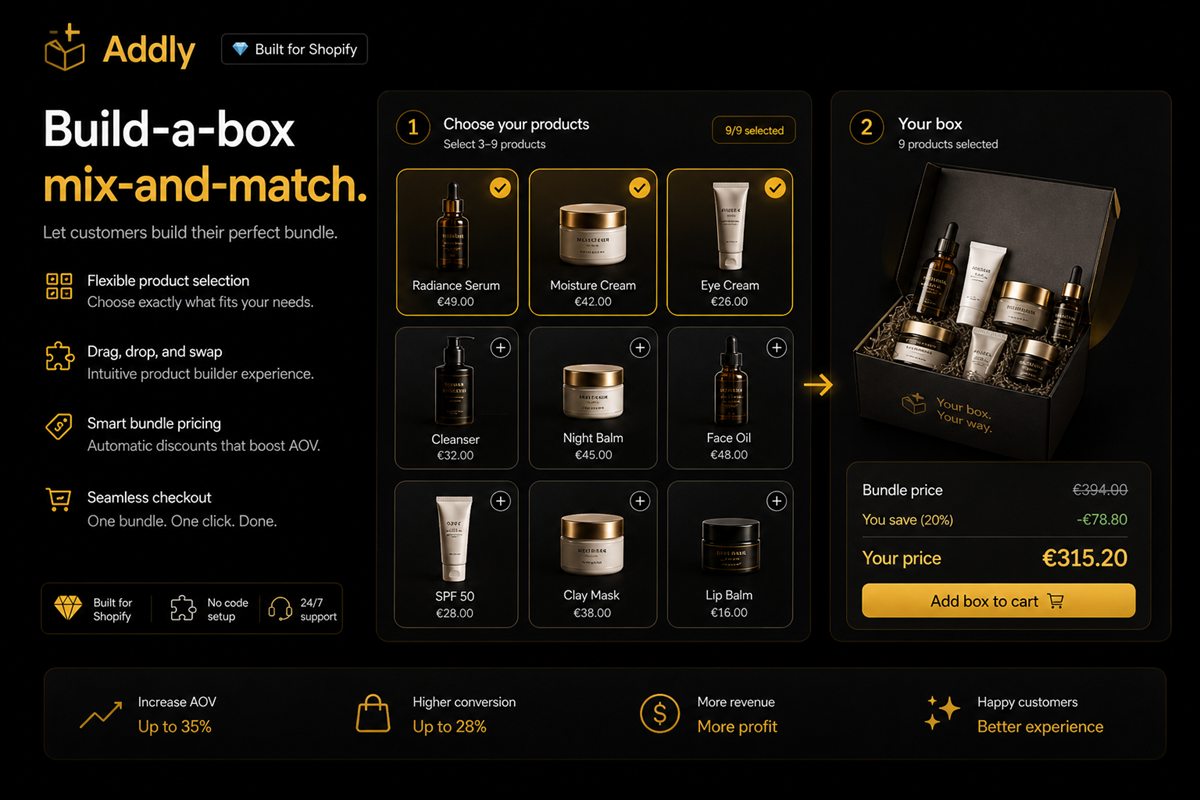
Key takeaways
- Structure beats freedom. A box with defined slots converts better than an open "pick any six" because it removes decisions rather than adding them.
- Six to twelve eligible items per slot is the practical range. Below six it feels restrictive, above twelve completion rate falls sharply.
- Price per box rather than per item wherever your margins allow. A flat box price is instantly comprehensible; a running total with variable discounts is not.
- The biggest operational risk is a single popular component going out of stock and silently breaking every box that includes it.
A build-a-box is the most engaging bundle format there is and the one most likely to be launched half-finished. It looks simple — let the customer pick a few things and give them a discount — and it hides a surprising amount of design and operational work.
Done well it produces genuinely higher order values, better first-purchase experiences and useful data about what your customers actually want together. Done carelessly it produces long, abandoned pickers and a support queue full of stockout emails.
Why structure beats freedom
The instinct is that more choice is more appealing. In practice the opposite happens: an open "pick any six from our catalogue" is a blank page, and blank pages produce abandonment.
Structure converts better because it does the hard part for the shopper. Compare:
Unstructured: Pick any 6 items, save 15%. The shopper has to decide what a good box even looks like, then execute it.
Structured: Choose 1 base · 3 flavours · 1 topping · 1 extra. The shopper only makes the fun decisions. You have already made the hard one.
The second version consistently completes at a higher rate and produces boxes with a better composition, because the slots encode your product knowledge about what actually goes together.
Designing the slots
Four principles.
Three to five slots. Below three it is not really a box. Above five, completion rate falls and mobile becomes painful.
Each slot should feel different. Slots that are functionally identical ("pick 3 flavours, then pick 3 more flavours") add steps without adding meaning. Merge them.
Order the slots by decisiveness. Put the easy, high-conviction choice first — usually the base or size. Early momentum matters; a shopper who makes one confident pick is much more likely to finish.
Six to twelve options per slot. Fewer feels restrictive; more stalls the shopper. If you have thirty eligible items, curate rather than dump the collection.
Pricing models
Three approaches, in descending order of how well they work.
Flat box price
"Build your box — $45." Simplest to understand and the strongest conversion driver, because the shopper's remaining decisions are purely about preference rather than cost. It also produces a predictable, defensible margin.
Requires that your eligible items have reasonably similar costs, or that you accept variance. Most stores solve this by tiering: a standard box and a premium box with a different eligible pool.
Percentage off the running total
"Pick any 6, save 15%." Easy to implement and flexible across price ranges, but it asks the shopper to track a moving number while choosing. Works, converts less well than flat pricing.
Tiered by count
"Any 3 save 10%, any 6 save 18%, any 9 save 25%." Combines the box format with a quantity ladder. Powerful, but it is two mechanics at once and the interface has to be very clear or it becomes confusing.
Whichever you pick: show the price prominently from the first screen. A shopper who spends three minutes building a box and then discovers the price is a shopper who abandons and remembers it.
The interface
Build-a-box lives or dies on the picker.
- Persistent progress indicator. "2 of 4 slots complete" or a filled-slot visual. The shopper must always know how far along they are.
- Live running total, even with flat pricing, so any extras are transparent.
- Editable choices. Going back to change slot 2 without losing slots 3 and 4 is essential. Forcing a restart is fatal.
- Mobile-first layout. Most boxes are built on phones. A grid that requires horizontal scrolling or pinch-zoom will not be completed.
- A completion state that is clearly a completion. The moment the box is valid, the primary action should change from "next" to "add to cart" and become visually dominant.
- Save and resume, if your average box takes more than a minute or two to build.
Inventory, which is where this actually gets hard
The operational side is the part that gets underestimated, and it is the part that generates support tickets.
A component goes out of stock mid-session. It must vanish from the picker immediately, and any in-progress box containing it needs a visible swap prompt with a suggested alternative. The failure state — completing a box and hitting an error at checkout — wastes several minutes of the customer's deliberate effort and is remembered.
Inventory must decrement on the components, not on a box SKU. This is the strongest argument for dynamic bundles over separate bundle products. If your box is a distinct SKU, your component stock levels are fiction the moment a box sells.
Partial returns. A customer returning one item from a six-item discounted box creates a refund calculation nobody has specified. Decide the policy up front: refund the discounted per-item price, not the full retail price, and make sure your team knows the rule.
Popular-component starvation. Boxes concentrate demand. One flavour will end up in 70% of boxes and will run out first, and its stockout degrades every box on the site simultaneously. Forecast component demand from box composition data, not from historical standalone sales.
When not to build one
Build-a-box is not universally right.
- Small catalogue. Below roughly eight suitable products there is not enough variety for the format to feel like a choice. A curated fixed bundle communicates value better and takes an hour instead of a week.
- High-consideration single purchases. Nobody builds a box of laptops.
- Products with wildly different costs. Flat pricing breaks, and the workarounds get complicated fast.
- Thin operational capacity. If you cannot reliably keep twelve components in stock, the format will generate more disappointment than revenue.
Measuring it
The important metric is not conversion — it is completion.
- Picker start rate — visitors who begin a box ÷ visitors to the box page.
- Completion rate — boxes completed ÷ boxes started. This is the health metric. Anything below roughly half suggests too many slots, too many options, or an unclear price.
- Drop-off by slot. Tells you exactly which decision is too hard. A cliff at slot 3 means slot 3 has too many options or an unclear purpose.
- Average box value compared with your standard AOV.
- Component distribution — which items appear in what share of boxes. This is your demand forecast and your merchandising insight in one table.
That last number is the quiet benefit of running a box at all. It tells you what your customers actually want together, which is more honest than any survey and more useful than any category report.
Frequently asked questions
What is the difference between build-a-box and mix-and-match?
Mix-and-match usually means picking any qualifying number of items from a collection for a discount. Build-a-box adds structure - defined slots with different eligible products for each, such as one base, two flavours and one extra. Build-a-box generally converts better because the structure guides the shopper rather than leaving them with an open field.
How many products should be available to choose from?
Six to twelve per slot works well. Fewer than six feels restrictive enough that shoppers question whether the box is worth it. More than twelve and completion rate drops as the shopper stalls, particularly on mobile where scanning a long grid is slow.
Should I price per box or per item?
Per box wherever your margins allow. A flat price is instantly comprehensible and makes the value obvious. Per-item pricing with a running discount requires the shopper to track arithmetic while choosing, which is exactly the cognitive load a box is supposed to remove.
What happens when a component goes out of stock?
It must disappear from the picker immediately, and any box in progress that contains it needs a clear swap prompt. The failure mode - a customer completing a box and hitting an error at checkout - is one of the worst experiences in ecommerce because it wastes several minutes of deliberate effort.
Are build-a-box bundles worth it for small catalogues?
Usually not. A box needs genuine variety to feel like a choice. With fewer than about eight suitable products, a curated fixed bundle communicates value more clearly and takes a fraction of the setup effort.