Addy
Addy  Addly
Addly  Goalify
  Monet
Monet  Reviso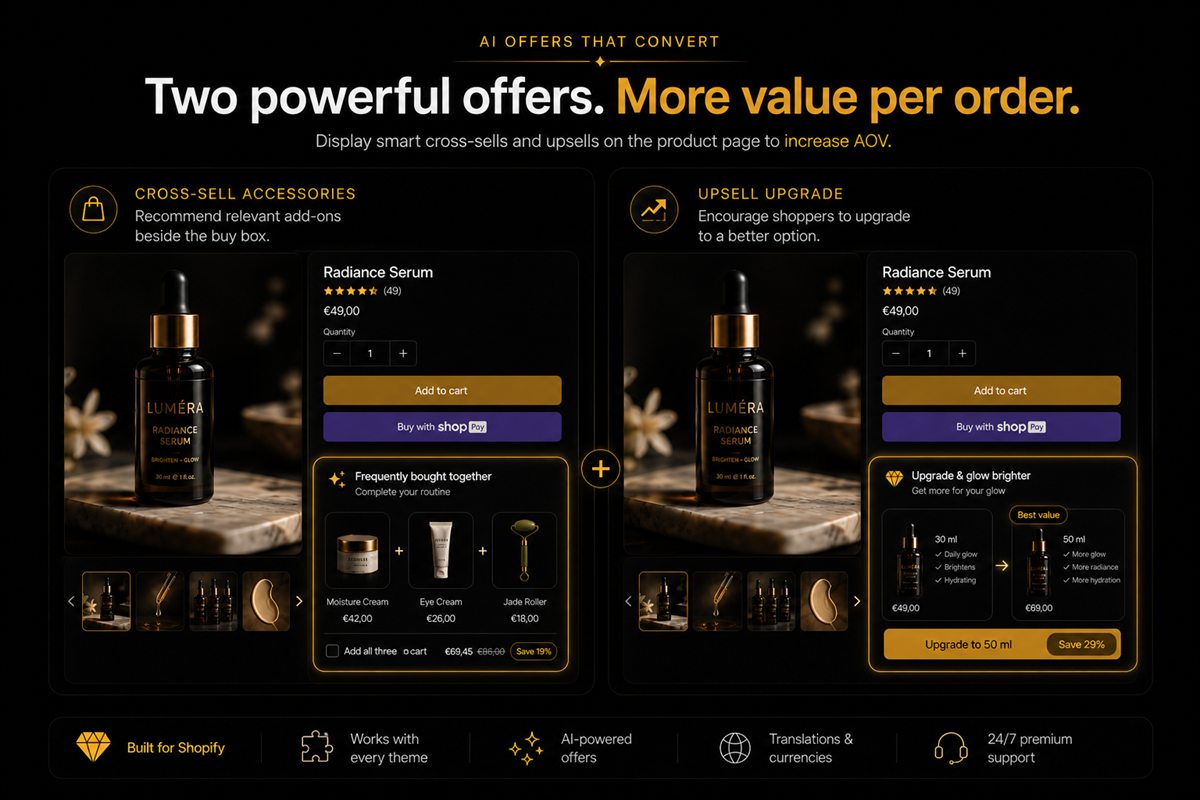
Key takeaways
- An upsell is a better version of the same job (larger size, higher tier, premium material). A cross-sell is a different job that pairs with this one.
- The product page can carry one of each at most, and they must not share a widget.
- Upsells belong in the buy box as a variant or plan choice. Cross-sells belong under add-to-cart as an optional extra.
- If you only have room for one, pick the one with the higher margin on the attached revenue, not the higher click rate.
- Every block on the product page needs a one-sentence purpose. If you cannot write it, delete the block.
An upsell is a better version of the product the shopper is already looking at (larger size, higher tier, premium material); a cross-sell is a different product that pairs with it (the belt with the trousers). On a Shopify product page the upsell belongs inside the buy box as a choice, the cross-sell belongs under the add-to-cart button as an optional extra, and the two should never share a widget.
People use "upsell" to mean anything that makes the basket bigger. That sloppiness shows up on product pages as a single widget trying to sell a larger size, a matching accessory and a totally different product from another collection. That widget is not a strategy. It is a tray. Separate the jobs.
What is an upsell?
The shopper already wants this job done. You are offering a better way to do it: more volume, a longer subscription, a premium material, a warranty that attaches to this item. The shopper leaves with one product, but a better or bigger one.
The UI is a choice inside the buy box. Plans, sizes, "upgrade to the kit". Not a second product card. If the shopper has to scroll past the add button to find the better version, the upsell is in the wrong place.
What is a cross-sell?
The shopper wants this, and also might want that: the belt with the trousers, the beans with the mug, the case with the phone. The shopper leaves with two products.
The UI is an optional extra under add-to-cart. A checkbox or a single card. Not a swap of the thing they came for. The best cross-sells come from order history, which is the approach described in frequently bought together on Shopify.
Upsell vs cross-sell at a glance
| Upsell | Cross-sell | |
|---|---|---|
| What changes | The item itself | The number of items |
| Shopper's question | "Which version?" | "Also this?" |
| Where on the page | Inside the buy box | Under add-to-cart |
| UI pattern | Variant, plan or tier selector | Single card or checkbox |
| Example | 500ml instead of 250ml | Beans with the mug |
| Best data source | Variant mix and margin | Order co-occurrence |
Why the distinction matters for conversion
The two offers ask different questions at different moments. An upsell question ("which version?") is part of deciding to buy. A cross-sell question ("also this?") only makes sense once the shopper has decided. Put the cross-sell in the buy box and you delay the main decision. Put the upsell under add-to-cart and the shopper has already chosen the smaller size before they see the larger one.
The distinction also matters for margin. Upsells usually improve margin on the same order line. Cross-sells add revenue that carries its own margin, which may be lower. Treating them as one "AOV widget" hides the fact that one of them may be making you less money per click.
How to set up each on a Shopify product page
Upsell in the buy box
- Make the better version a variant or a plan. If the 500ml is a separate product, consider merging it as a variant so it appears in the size selector.
- Label the difference in the option name. "250ml" and "500ml (best value)" says more than "Small" and "Large".
- Show the price change inline. The shopper should see what the upgrade costs without leaving the buy box.
- Keep it to one axis. Size or tier or plan. If the product needs several, use the theme's option selectors, not a widget.
Cross-sell under add-to-cart
- Pick one complementary product from order history, excluding variants of the current product.
- Place it immediately below the add button, as an optional card or a checkbox with a price.
- Write the one line of why. "Most people add the beans." "Fits this frame."
- Do not push the buy button down. If the cross-sell card makes the add button fall below the fold on a 390px screen, shrink the card or move it.
Placement on the product page is a topic of its own; where to place bundles on the PDP goes into the scroll-depth trade-offs.
One widget cannot do both
A carousel titled "You may also like" that contains a larger size, a colourway and a random accessory is three strategies colliding. The larger size should have been a variant. The colourway is not an offer. The accessory might be a cross-sell if it is actually complementary.
Clean it until each block has one sentence of purpose. If you cannot write the sentence, delete the block.
Common mistakes
- Cross-sells styled as swaps. A "Complete the look" card whose button replaces the cart line instead of adding to it.
- Upsells as separate products. The 500ml and 250ml as two listings, so the shopper never sees the choice.
- Confusing add-ons with cross-sells. An engraving or gift wrap is an add-on to this item, not a second product; the distinction is covered in product add-ons vs bundles.
- Ranking by clicks. A cross-sell that gets clicked and never bought is a distraction with good metrics.
- Repeating the offer. Showing the same cross-sell on the product page, in a popup and in the cart in one session is three asks for one product.
How to measure each
Measure upsells by the share of orders that take the higher variant or plan, and the margin difference per order. Measure cross-sells by attach rate (orders containing both products divided by orders containing the anchor) and the margin of the attached product. Do not measure either by clicks.
If you only have one slot
Compute attached revenue × margin for the best upsell and the best cross-sell over the last 90 days. Ship the winner. Curiosity about the loser is how pages get noisy again.
A quick worked example: say the buy-box upsell to the 500ml adds $6 of margin on 10% of orders, and the accessory cross-sell adds $4 of margin on 12% of orders. Per 100 orders that is $60 against $48. The upsell wins the slot, even though the cross-sell has the higher take rate.
When not to run either on the product page
- The product has no better version and no sensible pairing. A forced offer is worse than none.
- The page is already long and the add button sits deep on mobile.
- The cart drawer already carries the cross-sell. The cart can take the second job later; the product page does not have to, and in-cart upsells are often the better surface for it.
Frequently asked questions
What is the difference between a cross-sell and an upsell?
An upsell offers a better or bigger version of the product the shopper is already considering, such as a larger size, a premium material or a longer plan. A cross-sell offers a different, complementary product that does a related job, such as a belt with trousers. Upsells change the item; cross-sells add one.
Is a larger pack size an upsell or a quantity break?
It is an upsell if it is a different SKU, such as 500ml instead of 250ml. It is a quantity break if it is two units of the same SKU at a lower unit price. They need different UI and different measurement, so do not treat them as the same offer.
Should I upsell before the shopper has added to cart?
Yes. That is the point of a buy-box upsell; the shopper is choosing which version to buy, so the choice belongs before the add button. After add-to-cart you are in cross-sell territory, which is served by the cart drawer, a popup or a post-purchase offer.
Why do mixed upsell and cross-sell widgets convert poorly?
Because they ask two questions at once: "Do you want a better version?" and "Do you want something else?" Shoppers skip widgets that feel like a second catalogue, and the larger-size option gets lost among unrelated accessories.
Can AI choose between an upsell and a cross-sell?
It can rank candidates within one type, for example choosing which accessory to show. Whether a slot is an upsell or a cross-sell is a merchandising decision about the page, and you should make it yourself rather than outsource it to a model.
Where should a cross-sell go on a Shopify product page?
Directly under the add-to-cart button, as a single optional card or a checkbox. It should never replace the product the shopper came for or push the buy button down the page. One cross-sell in that slot is plenty.
How many upsells and cross-sells should a product page have?
One upsell in the buy box and one cross-sell under add-to-cart at most. More than that and the page turns into a catalogue, which is what the collection page is for. The cart drawer can carry additional offers later.