 Addy
 Addly
 Goalify
 Monet
 Reviso
 Rankly
Key takeaways
- Compare three numbers, not two: Shopify orders, Purchase events received in Events Manager, and purchases credited in Ads Manager. The gap between each pair has a different cause.
- Events Manager shows what Meta received. Ads Manager shows only the purchases Meta could tie to an ad inside the attribution window.
- Set data sharing in Sales channels → Facebook & Instagram → Settings → Data sharing settings. Standard relies on the browser pixel, which ad blockers can stop; Enhanced and Maximum add the Conversions API.
- A pixel pasted into theme.liquid next to the Shopify-connected pixel is the classic cause of inflated purchase counts. Remove the theme copy.
- Judge a gap on a closed window of a few weeks with dozens of purchases, in one time zone. Two or three orders a day tell you nothing.
Meta and Shopify will never match exactly, because they count different things. Shopify counts every order. Meta counts only the purchases it can tie to an ad. Your job is to work out how much of the gap is missing events, how much is duplicates, and how much is attribution. Each one has a different fix.
Most advice on this topic jumps straight to "install the Conversions API". That fixes one of three causes. Here is how to find which one you have first.
Compare three numbers, not two
Pick a closed window, for example the 28 days that ended at least a week ago. Use the same time zone in Shopify and Meta. Then pull:
- Shopify orders for the window (Orders, or Analytics).
- Purchase events received in Meta Events Manager.
- Purchases credited in Ads Manager for the same dates.
Now read the gaps in pairs:
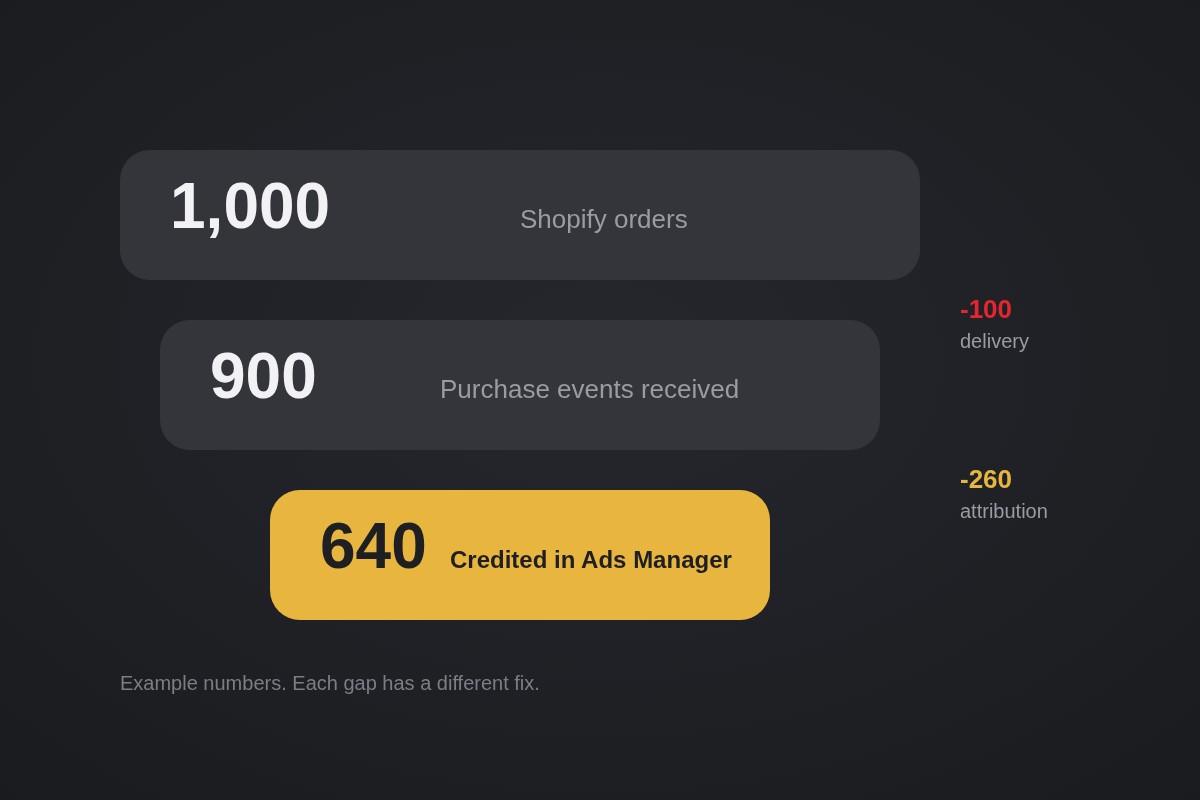
- Orders vs events received: a delivery problem. Events never left your store, or were blocked.
- Events received vs credited: an attribution problem. Meta got the purchase but could not tie it to an ad, or the buyer is outside the window.
- Credited above orders: a duplicate problem.
A worked example, labeled as such: 1,000 Shopify orders, 900 Purchase events received, 640 credited in Ads Manager. The 100-event delivery gap is a tracking fix. The 260-event attribution gap is mostly not a fix at all.
Don't judge small samples
One community thread described 5 Purchase events against 2 in Ads Manager and asked if 60 percent tracking was a problem. Replies pointed out the sample was too small to say. At a few orders a day, a single late purchase or one test order moves the ratio by 20 points.
Wait for a few dozen purchases in the window. Exclude test orders. Compare the same dates in both tools. If your volume is low, compare a full month rather than a week.
Fix missing events: pick the right data sharing level
If orders are well above events received, check how your store sends data. In your Shopify admin, go to Sales channels → Facebook & Instagram → Settings → Data sharing settings. Under Customer data sharing, turn on data sharing and pick a level under Choose level. Per Shopify's data sharing help page:
- Standard uses the Meta pixel to collect browsing data. A browser-based ad blocker can prevent the pixel from sharing data.
- Enhanced uses the Conversions API and the pixel. Data sent from server to server can't be blocked by browser-based ad blockers. It shares name, location, email, phone number and browsing behavior to help Meta match people on its network.
- Maximum also uses the Conversions API and the pixel, and the store is updated with Meta's latest advertising technology. It shares the same customer data types as Enhanced.
If you are on Standard and your orders-to-events gap is large, move to Enhanced or Maximum. The levels available can differ depending on when you installed the app, so what you see may not match a screenshot in someone else's guide.
If no pixel is connected, click Connect next to the pixel you want, or create a new one. Once the data is flowing, wait for customer activity. A newly connected pixel shows nothing in Meta until shoppers do something.
Fix duplicates: one pixel, one purchase
When Ads Manager shows more purchases than you have orders, look for a second pixel. Shopify's pixel help warns that a pixel added by editing theme code must be removed before you connect one through the Facebook & Instagram channel. Otherwise the store can end up with more than one pixel and duplicate or incorrect data.
To remove an old theme pixel:
- Go to Online Store → Themes → … → Edit code on your live theme.
- Open
theme.liquid. - Delete the Meta pixel code between
<head>and</head>. Save. - Check Online Store → Preferences. If there is a pixel in the Meta pixel section, click Change, delete it and save.
Then run a test:
- Place a real low-value order or a test order.
- Open Events Manager and find the Purchase event.
- Confirm it appears once. Refresh the thank-you page and confirm it does not appear again.
If you use a second tag tool, a custom server setup or an app alongside Shopify's channel, make sure the pixel and server versions of Purchase send the same event name and event ID. Without a shared ID, Meta cannot treat them as one purchase.
Understand the attribution gap
This is the gap most merchants cannot fix, and shouldn't try to. Ads Manager credits a sale to an ad only inside an attribution window. Most sales campaigns report a click window and a shorter view window; check the setting on your ad set rather than assuming it. Shopify has no window at all. It records the order on the day it was placed.
That produces three predictable differences:
- Date logic. Ads Manager can date a purchase to the day the ad was seen or clicked. Shopify dates it to the order. A purchase ten days after a click is a Shopify order and not a credited Meta purchase.
- Reporting lag. Recent days under-report because late purchases are credited back to earlier days. Never judge yesterday.
- Overlap. Meta, email and Google can each claim the same order. Meta can look better than it is, and also worse when a buyer clicked an ad but returned through another channel.
Ads Manager has a way to compare attribution settings side by side. Use it to see how much of your result is click credit and how much is view credit before you change any budget.
A weekly routine that catches real problems
Once the setup is clean, spend ten minutes a week on four numbers:
| Number | Where |
|---|---|
| Shopify orders | Shopify admin |
| Purchase events received | Meta Events Manager |
| Orders from Meta traffic | Shopify, filtered by UTM source |
| Purchases credited | Ads Manager |
Write them in a sheet. A steady ratio is normal. A sudden drop in events received after a theme change or app install points to broken tracking. A sudden jump in credited purchases points to duplicates.
Use Meta's numbers to compare ads against each other. Use Shopify revenue and your payment processor total as the source of truth for what you earned. Both can be right at once. If your product page loses shoppers before they ever reach checkout, the free CRO audit is a better next step than another tracking tweak.
Which fix to make first
- Orders far above events received: raise data sharing to Enhanced or Maximum.
- Credited above orders: remove the second pixel and test one order.
- Events received close to orders but credited lower: leave tracking alone and compare a closed window with the same attribution setting.
- Everything looks fine and you are still unsure: wait for more purchases.
Do these in order. Changing three things at once leaves you unable to tell which one worked.
Frequently asked questions
What gap between Meta and Shopify is normal?
There is no official number. Meta only counts purchases it can tie to an ad, and Shopify counts every order, so Meta will usually show fewer. Community threads quote ranges from single digits to 30 percent, but none are sourced. Watch for sudden changes in your own ratio rather than chasing a universal figure.
Why does Ads Manager show more purchases than Shopify?
Usually duplicates or overlap. A pixel installed twice, or pixel and server events with different event IDs, count one order twice. View-through credit and other channels claiming the same order can also push Meta above what the store recorded.
Should I turn on Maximum data sharing?
Enhanced and Maximum both send events server to server, so browser ad blockers cannot stop them, and both share name, location, email and phone to improve matching. Tell customers how you share data and keep your privacy policy current, as Shopify advises.
How do I check that a purchase fires only once?
Place a real low-value order or a test order, then watch the Purchase event in Events Manager. Refresh the thank-you page and confirm it does not fire a second time. If one order shows two Purchase events, look for a second pixel before changing anything else.