Addy
Addy  Addly
Addly  Goalify
  Monet
Monet  Reviso
  Rankly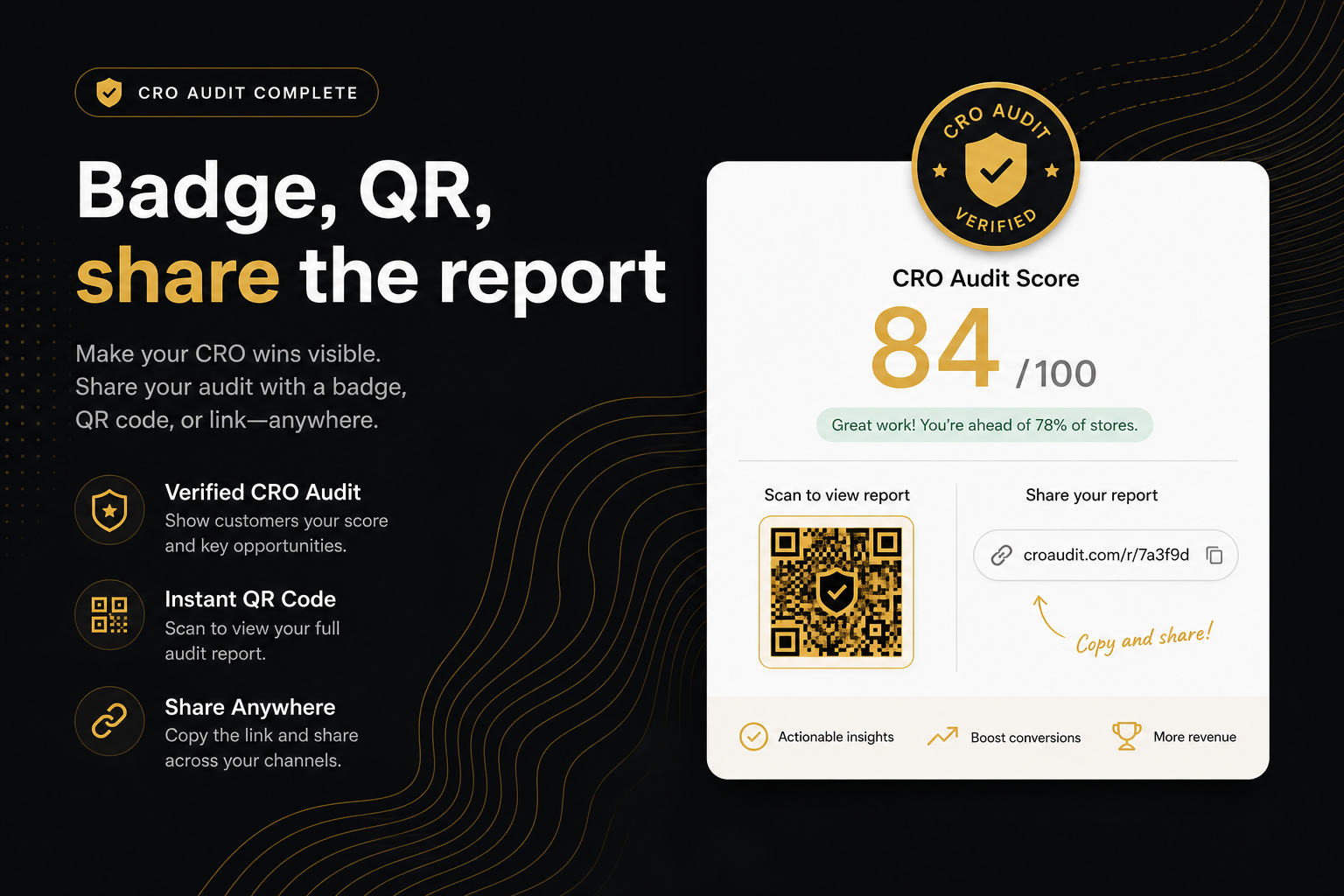
Key takeaways
- Get badge & flex it downloads a high-resolution PNG: score, verified mark, QR to the snapshot.
- The share link is ?r={id}. Opening it does not re-audit the store.
- Reports stay until the merchant deletes them with content="no,delete". Re-run if you need a fresh artefact.
- The PDF is the punch list. The badge is the number. Do not present the badge as a full diagnosis.
- Caption every badge with the exact product URL and the date, and never crop the QR if you are claiming the number is real.
After a run, the CRO Audit for Shopify stores lets you export a compact PNG badge showing the health score, a verified mark and a QR code. The QR opens the saved report snapshot on ninety9.dev through a ?r= link; it does not recrawl the store. Snapshots stay until the merchant deletes them, and the PDF carries the full punch list behind the number.
A health score nobody can verify is a tweet. The audit pairs the number with a snapshot you can open later.
What is the audit badge?
After a run, Get badge & flex it exports a compact dark chip at 3× so it is sharp on a slide. It shows the health score, a verified mark, and a QR. The on-page report also shows the status (Solid, Strong, Uneven, Patchy, Thin, and the rest of the score band) with a line such as Fail in Rubric A beside it — that line is the diagnosis, not the title.
Use it on LinkedIn, Slack, a course submission, a sales deck cover. Caption it with the product URL and the date. Do not crop off the QR if you are claiming the number is real.
How do the QR code and the ?r= link work?
The QR encodes the saved report on ninety9.dev. Query param r is the id. Opening that URL paints the punch list from disk. It does not fetch the merchant’s store again.
That matters for:
- Teachers who want the work behind the number without a surprise recrawl changing the score.
- Agencies who send a link in an email at 6pm and a client who opens it at 9am.
- You, comparing a screenshot from last month — until the merchant deletes the snapshot.
Badge, PDF or share link: which should I send?
| Artefact | What it shows | Best for | Not for |
|---|---|---|---|
| Badge (PNG) | Score, verified mark, QR | Slide covers, LinkedIn, Slack | Explaining what to fix |
| Ranked fails, owners, screenshots | The person who will fix a row | A one-glance summary | |
?r= link | The live on-page report from the snapshot | Email, tickets, follow-up calls | Proving a fix — that needs a re-run |
Send the badge when someone needs the number. Send the PDF when someone needs the work. Send the link when they need both and might want to come back to it.
What is in the PDF?
The PDF matches the on-page report: ranked fails, owners, screenshots when they exist. Use it when someone will actually fix a row. The badge will not.
How do I share a score properly?
- Run the audit on the exact
/products/URL you are talking about, not the homepage. A homepage paste scores a bestseller, which is fine for a first look and wrong for a claim about a specific page. - Export the badge and the PDF while the report is open.
- Copy the
?r=link from the address bar. - Caption the badge with the product URL, the date and the status word. “86, Solid,
/products/the-handle, 21 Sep” is enough. - Put the
?r=link where the reader can click it — the post, the email, the ticket.
If you are presenting the score to a client, the agencies guide covers how to scope from it without overclaiming.
What is stored, and for how long?
JSON: title, handle, URL, scores, findings, optional screenshots, share id. IP is used for rate limits, not printed on the badge. See the privacy policy for the full list of what the audit sees (public HTML, catalogue JS, cart, rendered add-to-cart) and what it does not (checkout, customers, passwords).
Merchants can block future audits with <meta name="ninety9-audit" content="no"> in theme.liquid. That does not delete a snapshot already saved. To erase stored reports, use content="no,delete", then paste the shop URL on the CRO audit page and press Get my free audit. After that the QR and ?r= link stop resolving.
Common mistakes when sharing a score
- Cropping the QR. Without it, the badge is a typed number.
- Editing the PNG. The QR opens the real report, so an edited score contradicts itself.
- Calling a homepage-resolved bestseller “the whole store”. If the SKU matters, paste
/products/...yourself. - Pasting a competitor into a public LinkedIn post unless you are ready to discuss their PDP in public.
- Presenting the badge as a diagnosis. The status line and the ranked fails are the diagnosis; how to read the health score explains why the number alone is not enough.
When should I re-run instead of resharing?
- After any theme change or app install on that product page. The snapshot is frozen; the page is not.
- When you are claiming a fix. Proof of a fix is a second report on the same URL, not the old link.
- When the merchant has deleted the snapshot. A dead QR on a slide is worse than no QR.
- When the original run was a homepage paste and the conversation has moved to a specific product.
A worked example
An agency runs the client’s domain on a Tuesday call, exports the badge, and emails the ?r= link at 6pm. The client opens it at 9am the next day and sees the identical report — no recrawl, no shifted score. Week one, the agency fixes the sticky add-to-cart in the theme, hits Audit again on the same product URL, and exports a second badge. The two badges side by side, each with its own QR, are the before/after. Neither has been touched in an image editor.
The badge is theatre with a receipt. The receipt is the report id. Run the audit, export both, then go fix the top constraint.
Frequently asked questions
What is this score based on?
Ninety9’s product-page rubric — defaults we apply the same way on every public Shopify PDP. It is not a conversion-rate prediction, and it will not fit every store or situation. How we score.
Does scanning the QR recrawl the store?
No. It opens the saved JSON snapshot. Use Audit again on the audit page when you want a live pass.
Who can open my CRO audit report?
Anyone with the link. Treat it like a public URL. Do not put secrets in the theme you would not show a stranger — the audit only sees the public page anyway.
Can I edit the score on the badge?
No. The PNG is generated from the report. Changing the file in Photoshop to invent a 100 is lying to your class or client, and the QR will open a snapshot that contradicts you.
How long does a CRO audit share link last?
Until the merchant deletes them. Add content="no,delete" in theme.liquid, then paste the shop URL on the CRO audit page and press Get my free audit. After that the ?r= link and QR stop resolving. Re-run the same product URL if you need a fresh artefact.
Why is the QR so dense?
Error correction is high so a slide photo still scans. There is a quiet zone and a small centre mark. It is meant to survive LinkedIn compression.
Will a teacher accept the badge as evidence?
Give them the badge and the PDF. The PDF is the ranked fails. The badge is the cover. Caption the exact product URL so the work can be checked.