Addy
Addy  Addly
Addly  Goalify
  Monet
Monet  Reviso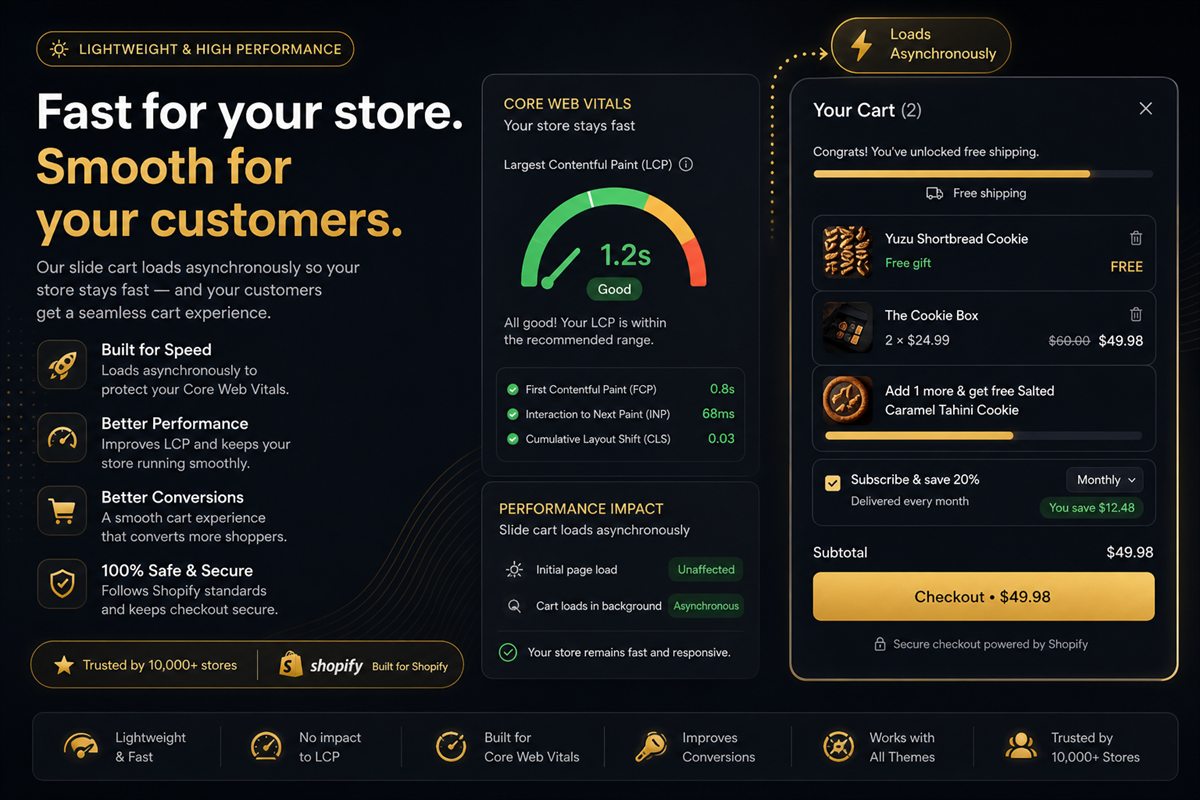
Key takeaways
- A cart drawer should never appear in the initial HTML of the product page. If it does, it is in the LCP path whether you can see it or not.
- Load the app as a theme app extension, asynchronously, and render the drawer on first open — not on first paint.
- Images in the drawer (product thumbs, upsell cards) must be lazy. They are off-screen until the shopper adds something.
- Measure LCP on a product page with the app on and off. If it moved, the drawer is doing work too early.
- If the app is unreachable, native add-to-cart must still work. A widget that can take down buy is worse than no widget.
A cart drawer should never cost you Largest Contentful Paint. If it adds work to first paint, it is a tax on every session, including the ones that never open the cart. The rule is simple: the drawer does not exist until someone needs it. Everything else is implementation detail.
Upsells, progress bars and branded chrome can live in that drawer. They cannot live in the initial HTML of the product page.
What LCP has to do with a cart drawer
Largest Contentful Paint is the moment the main content of the page becomes visible. On a Shopify product page that is usually the featured image, sometimes a heading. A cart drawer is not that content. If the drawer still shows up in the LCP path, it is because its markup, fonts or JavaScript ran too early.
A delay of a couple of hundred milliseconds on LCP is not a conversion feature. It is slower product pages for people who have not added anything yet. The cart drawer itself can still be the right UX. The loading pattern is the variable.
Where drawers show up in the critical path
Three patterns show up in real stores:
- The HTML is in the page. The drawer markup is in the initial response, hidden with CSS. Images inside it still decode. Fonts still swap. LCP still pays.
- The JavaScript is in the page. A large bundle parses on every product page so that a drawer could open. Parse time is main-thread time.
- The app injects into theme.liquid. This is the legacy pattern. It is also the one Shopify has spent years trying to kill, for good reason.
The pattern that does not show up in LCP: a theme app extension, loaded asynchronously, that fetches drawer UI on first open and caches it for the session.
Theme app extensions remove the worst failure mode. They do not stop an app from downloading a large bundle on load. Check the network panel on a product page before you trust the marketing site.
How to load a drawer without touching LCP
- Install the cart as a theme app extension, not a script pasted into
theme.liquid. - Confirm the drawer markup is not in the initial HTML. View source on a product page with an empty cart. You should not see line items, upsell cards or a checkout button for the app.
- Do not preload the drawer. Fetch on first add-to-cart, then keep it warm for the rest of the session.
- Lazy-load every image inside the drawer. Product thumbs and upsell cards are off-screen until the shopper adds something.
- Fire cart analytics on open or on offer impression, not on page load.
If the first open takes a moment to paint, that is acceptable. It is a click later, not a tax on landing. Preloading a UI the shopper has not opened yet is paying for work you may never need.
What to measure before and after you install
Before you install anything, record on a representative product page:
- Largest Contentful Paint
- Total blocking time
- Transfer size of JS on load
Install the app. Repeat the same page, same device, same throttling. If LCP moved by more than a rounding error, the drawer is doing work at the wrong time.
Do not trust a homepage test. Homepages often have a hero image that masks a JavaScript regression. Product pages are where carts actually live.
Worked example: you record LCP on /products/navy-tee on a throttled mobile profile, install the drawer, and repeat. If LCP is unchanged and JS transfer on load is barely moved, the app is behaving. If LCP jumped and a new bundle appeared in the network panel before anyone clicked add-to-cart, the drawer is in the critical path. Replace it.
Images and upsells
Every upsell card is an image request. If those requests start on page load, you have built a carousel the shopper did not ask for. Lazy-load thumbs. Decode on open.
In-cart upsells are the usual reason merchants accept a heavier drawer. That is fine after the click. It is not fine as twelve product images competing with the featured image on first paint.
The same rule applies to branding assets. Do not load a second webfont just for the drawer heading. Inherit the theme stack so you are not paying a font swap on every PDP.
Analytics and app pixels
Fire cart pixels on open or on offer impression, not on page load. Cart-level analytics that run on every product page are a common source of main-thread work that nobody asked for.
If you need to know that the drawer code loaded, that is a development check, not a shopper event. Shopper events start when the drawer opens or when an offer is seen.
The fail-safe
If the app is unreachable, the drawer should not render and the theme's native add-to-cart should still work. A conversion widget that can take down add-to-cart is worse than no widget. Fail safe, always.
Check this on purpose: block the app domain in the browser, add to cart, and confirm the product still goes into Shopify's cart. If buy dies with the app, you do not have a performance problem. You have a single point of failure on the money button.
Frequently asked questions
Will a cart drawer app slow my store down?
It should not. A well-built drawer loads asynchronously, renders only when opened, and never blocks the initial paint. If your Largest Contentful Paint changes after install, the app is in the critical path and you should replace it.
Does Shopify's theme app extension model guarantee speed?
It removes the worst failure mode — a script injected into theme.liquid that runs on every page. It does not stop an app from downloading a large bundle on load. Check the network panel.
Should I preload the drawer?
No. Preloading a UI the shopper has not opened yet is paying for work you may never need. Fetch on first add-to-cart, then keep it warm for the rest of the session.
What about app pixels and analytics in the cart?
Fire them on open or on offer impression, not on page load. Cart-level analytics that run on every product page are a common source of main-thread work that nobody asked for.
Where should I measure LCP after installing a cart app?
On a representative product page, not the homepage. Homepages often have a hero image that masks a JavaScript regression. Product pages are where carts actually live. Repeat the same URL, device and throttling with the app on and off.
Is a slower first open of the drawer acceptable?
Yes, if it is a click later and not a tax on landing. A first open that takes a moment to paint is better than 200ms of Largest Contentful Paint on every session, including the ones that never open the cart.