 Addy
 Addly
 Goalify
 Monet
 Reviso
 Rankly
Key takeaways
- Chinese New Year falls on Saturday, February 6, 2027, but output starts dropping in late January and does not look normal again until early March.
- Treat mid-January as your last order date for China-direct stock that has to arrive before the break, then confirm each supplier's own dates in writing.
- On Shopify, Continue selling when out of stock only works when Inventory tracked is on, and it does not apply to POS orders.
- Put the delay notice on the product page and in the order confirmation email, not only in the footer.
- Decide per product whether to keep selling, take pre-orders or switch the product to Draft until the supplier reopens.
Chinese New Year 2027 starts on Saturday, February 6. Order your China-made stock by mid-January, set each product to sell, pre-order or pause on Shopify before then, and tell customers about delays on the product page. Do it in December and you are doing it on a calm week. Do it on January 28 and you are refunding orders.
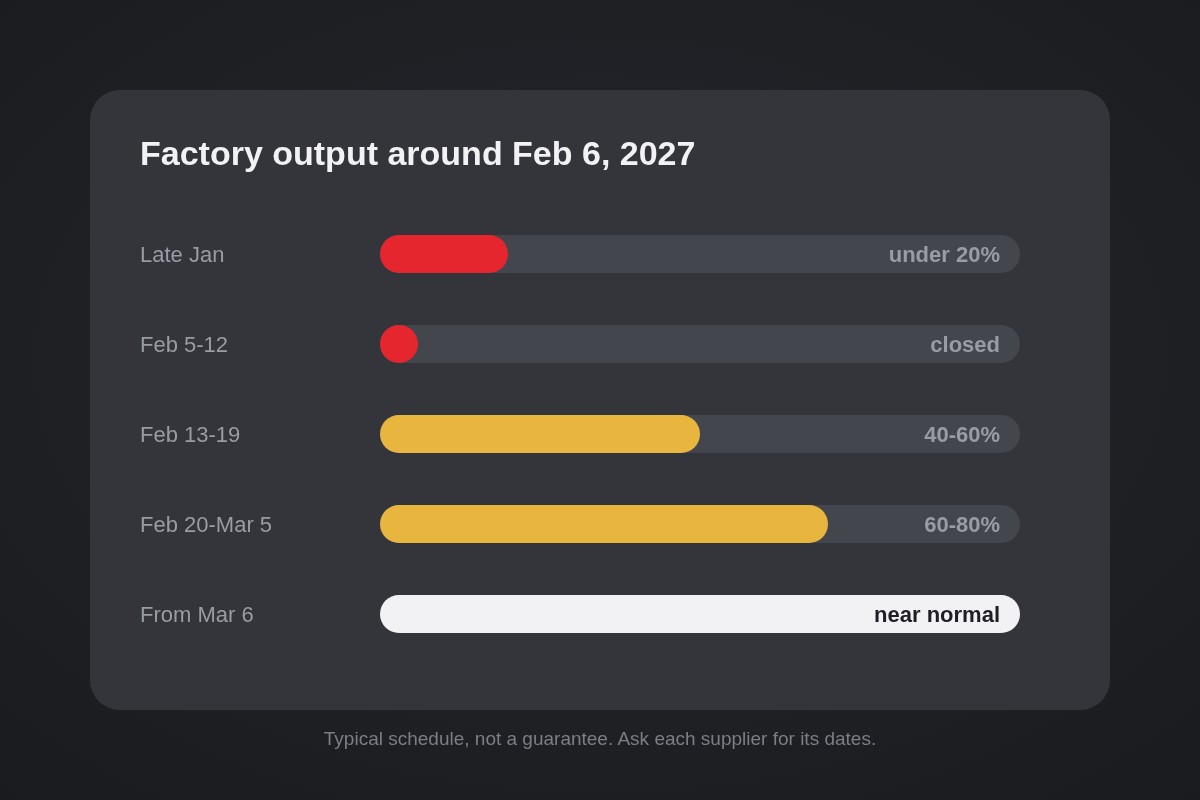
The shutdown is not one day. Factories wind down in the weeks before and ramp up slowly after. One published production schedule puts the pre-holiday slowdown at late January to February 4, the holiday closure at February 5 to 12 (often plus three to five days), and output at roughly 40 to 60 percent in the first week back. It calls the full disruption four to six weeks. Source: NewBuyingAgent's 2027 schedule.
Most guides stop at "order early." This post covers the part they skip: what to change inside Shopify.
Get the real dates from each supplier
Public holiday dates are a guide, not a schedule. Sources disagree on the official break: one lists February 5 to 12, another February 5 to 13, and the Doba guide notes February 14 is a make-up workday in China, so the first normal week is later than it looks. Doba's 2027 dropshipping guide recommends getting each supplier's holiday schedule in writing in December and treating mid-January as the cutoff for China-direct orders.
Send one message to every supplier this week. Ask for:
- The last day they will accept orders for shipment before the break.
- The last day they physically ship.
- The first day they ship after the break, and how backed up they expect to be.
- Whether they can hold stock for you, or ship early.
Paste the answers into a sheet with one row per supplier. You will use those dates in every step below.
Sort products into three buckets
Not every product needs the same treatment. Pull your top sellers from Analytics and sort them:
- Keep selling: stock you already hold, or will hold before the cutoff.
- Pre-order: products that will run out before restock, where customers will wait.
- Pause: products with no stock coming and no realistic ship date, or ones customers will not wait for.
Check your seasonal lines first. February is Valentine's Day, and the Ecommerce Fastlane guide warns that seasonal items ordered after the shutdown may arrive late. A product that sells for one week in February is a pause or a pre-order candidate if it is not in your warehouse by late January.
Keep selling without overselling
If stock is tracked in Shopify, it stops selling at zero. That is what you want for products you cannot restock. For products you can, check the numbers are accurate before the rush: with more than one active location, Shopify says that if the location fulfilling online orders has zero or less stock, the product still shows as out of stock online even when another location has units. Add stock to the fulfilling location, not just anywhere.
Then work backwards from your last order date. Example: if a product sells 40 a week and your supplier needs the order by January 15 to ship before the break, and you want to cover until a post-break shipment lands in late March, you are buying roughly 10 weeks of stock in one order. Labelled as an example, but the sum is the point: the order that has to cover the gap is larger than your normal reorder.
Set up pre-orders the Shopify way
For products you can still sell while stock is out:
- Open the product in your admin and go to the Inventory section.
- Make sure Inventory tracked is on. Shopify only lets you pick the next option when it is.
- Select Continue selling when out of stock. Shopify's help page has the same steps.
Two limits worth knowing. The setting does not apply to Shopify POS orders: staff can keep selling at zero, and POS warns them first. And Shopify does not add a "ships in March" message for you. You have to write it.
If you are using a dropshipping app and products show as out of stock despite stock being available, Shopify notes the app's location may be missing shipping rates.
Pause products you cannot ship
This is the question merchants actually ask. In a Shopify Community thread, a merchant whose supplier stopped fulfilling from January 31 to February 19 had to refund a customer and asked how to stop more orders. Shopify Support's answer: deselect the Online Store and other sales channels in each product's availability settings, keep the products in the catalog, and use the bulk editor to do many at once. The catch the thread notes is that the bulk editor handles up to 50 products per page, so budget time if you have hundreds.
Other options from Shopify's product statuses:
- Draft means the product cannot be sold yet.
- Archived means the product is no longer for sale and is hidden from your admin and customers. You can restore it from the Archived tab with Unarchive product.
Draft or channel removal is better than archive for a pause, because you will switch them back in March. Write the restore date on your supplier sheet. Set a calendar reminder for the day your supplier says it is processing again.
Before you hide anything, check what links to it. Collections, ads and email campaigns pointing to a hidden product send visitors to a dead end, so pause the ads first.
Tell customers early, in four places
Delay messaging works best when the customer sees it before they pay. Cover:
- Product page. One line near the button: "Ships from our overseas supplier. Orders placed after January 15 ship in March." Use the actual date.
- Announcement bar. In the theme editor, edit your announcement bar with the same cutoff, from the first week of January.
- Order confirmation email. Edit the template under Settings → Notifications so pre-order customers see the date again.
- Support replies. Write a "where is my order" template now. Doba's guide suggests contacting customers early about stalled orders rather than waiting for them to ask.
If you show delivery dates in the cart or product page, extend them for China-direct products only. Our post on estimated delivery dates covers how to present them without scaring buyers off stock you hold locally.
Give customers an exit that is not a ticket
Some customers will see the delay and want to change their mind. Others will order a delayed item next to an in-stock one and want to split or drop it. Every one of those is a support email unless they can fix it themselves.
Reviso is a free app that lets customers edit address, shipping, variants, quantities and items before fulfilment, deflect cancellations, and handle returns and exchanges. For a shutdown, that means someone who ordered a delayed item can swap it for an in-stock one or cancel before it ships, without writing to you. It only works before fulfilment, so pair it with a clear cutoff. Our posts on letting customers cancel their own order and order edit cut-off windows cover the policy side.
A December to March checklist
- By December 5: supplier dates in writing, buckets assigned.
- By mid-December: restock orders placed for proven sellers, ads for at-risk products paused or redirected.
- Early January: announcement bar live, product page lines live, pre-order settings on.
- Mid-January: last China-direct orders placed. Pause products that will not ship.
- February 5 to 12 and after: keep extended estimates. The Doba guide says to keep them until suppliers confirm normal processing.
- Early March: restore products, remove the bar, check inventory counts.
Frequently asked questions
When is Chinese New Year in 2027?
Chinese New Year's Day is Saturday, February 6, 2027. The official holiday in China is reported as February 5 to 12 or 13 depending on the source, and many factories close for longer. Ask each supplier for its own closure notice instead of relying on the public holiday.
How do I stop Shopify orders for products my supplier can't ship?
Set those products to Draft so they cannot be sold, or remove them from the Online Store sales channel in the product's availability settings. Shopify Support's guidance is to use the bulk editor for many products at once, then switch them back when the supplier reopens.
Can I take pre-orders on Shopify during the shutdown?
Yes. Turn on Inventory tracked for the product, then select Continue selling when out of stock in the Inventory section. Tell customers on the product page when the item will ship, because Shopify will not show that for you.
How long are delays after Chinese New Year?
Expect about four to six weeks of disruption from late January to early March. In one published schedule, output is roughly 40 to 60 percent of normal in the first week back and near normal from about March 6. Keep extended delivery estimates until your supplier confirms normal processing.