Addy
Addy  Addly
Addly  Goalify
  Monet
Monet  Reviso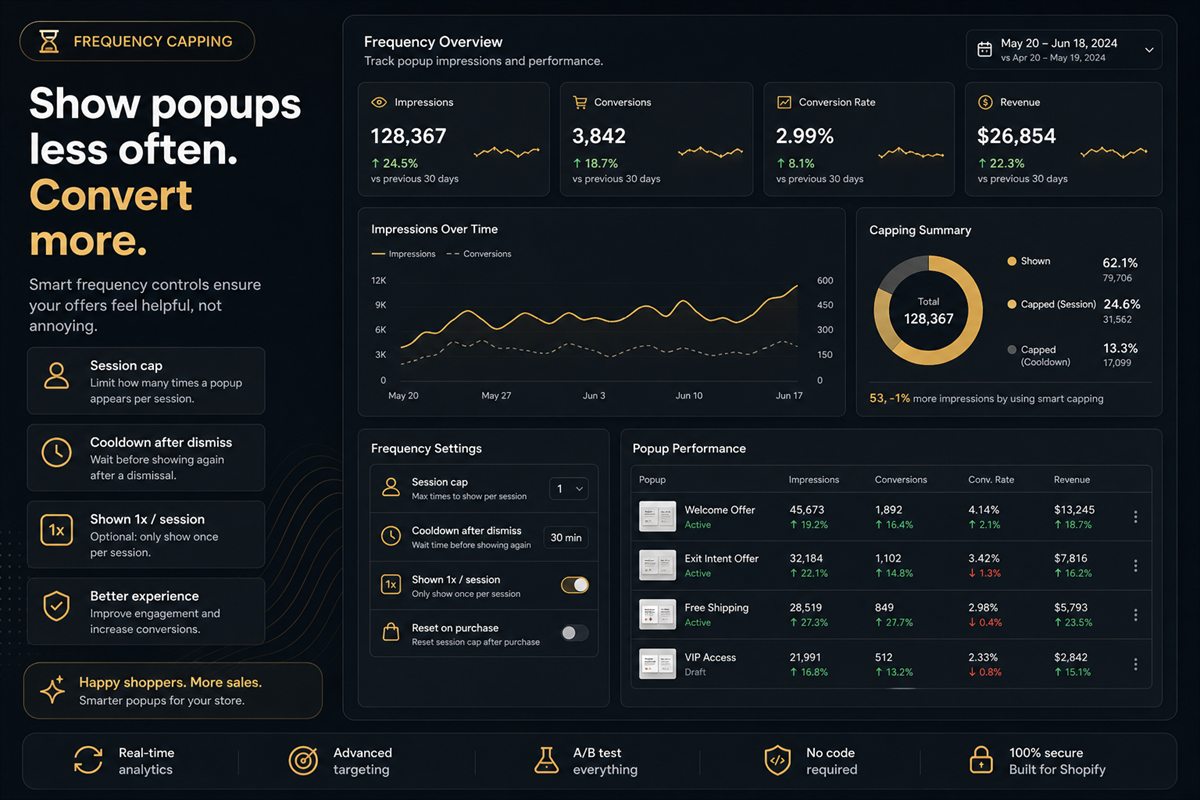
Key takeaways
- One popup per session is the default. A second showing of the same offer is a nag, not a reminder.
- Honour dismiss. If they closed it, wait days, not minutes — and do not reopen it on the next page view.
- Frequency caps must persist across pages in the session. A cap that resets on navigation is not a cap.
- After they add the offered product, never show that popup again. The job is done.
- Caps apply across triggers. An add-to-cart offer and a checkout-initiation offer in the same visit is two asks.
The right frequency cap for a Shopify upsell popup is one impression per offer per session, with a cooldown of days (not minutes) after a shopper dismisses it, and no further showings once the offered product is in the cart. Showing the same popup twice in one visit costs more in closed tabs and reflexive dismissals than it earns in extra adds.
Popups do not fail because the offer is wrong. They fail because the store asked again. A shopper who closes an overlay has given you an answer. Showing the same overlay on the next collection page is not persistence. It is not listening.
What is popup frequency capping?
Frequency capping is the set of rules that decide whether a popup is allowed to fire this time, given what this shopper has already seen. It covers four things:
- Session cap. How many times an offer can appear in one visit.
- Dismiss cooldown. How long to wait after a shopper closes the popup before it may appear again.
- Cross-trigger rules. Whether an add-to-cart popup, an exit-intent popup and a checkout-initiation popup count against the same limit.
- Completion rules. What happens after the shopper adds the offered product.
A popup without these rules is a script that fires whenever its trigger condition is true. That is not a strategy; it is a loop.
Why frequency matters more than the offer
An overlay interrupts. The first interruption is a question. The second is a nag. By the third, the shopper is no longer reading the popup; they are hunting for the close button before it has finished animating. That reflex does not reset when you change the product in the overlay. It attaches to your store.
Interruptions compound into a brand feeling. Shoppers who have learnt to dismiss your popups also skim your cart drawer, distrust your urgency bar and ignore your post-purchase offer. Frequency capping protects every other conversion feature you run.
The default cap
One impression per session, per offer. Not per page. Not per trigger. If they saw it after add-to-cart, they have seen it. Exit-intent does not get a second bite in the same visit.
| Event | Show the popup? |
|---|---|
| First trigger this session, offer never seen | Yes |
| Same offer shown earlier this session | No |
| Shopper dismissed it within the cooldown window | No |
| Offered product already in the cart | No |
| Different offer, cart contents have changed | Sometimes, and only once |
How to set frequency caps on Shopify
Popup frequency lives in your popup app, not in Shopify admin. The steps are the same whichever app you use:
- Set the session cap to one per offer. If the app only offers a per-page cap, that is a warning sign.
- Turn on dismiss memory. Closed means no. Store it for the session immediately, and for a week or two for returning visitors.
- Make the cap span triggers. If you run more than one trigger, check that the app treats "shown once this session" as a shared state. The ranking in popup triggers ranked assumes you are choosing one primary trigger, not stacking three.
- Suppress after add. If the offered product is in the cart, the offer is finished for that session.
- Persist across pages. The cap must survive navigation. Test by triggering the popup, closing it, and browsing three more pages. If it comes back, the cap is not working.
- Check the "don't show again" control. If your popup has one, it must do what it says. A checkbox that does nothing is worse than no checkbox.
Honour dismiss
Closed means no. Store that for the session immediately, and for a week or two if they are a returning visitor. A shopper who says no to the beans on Monday has not changed their mind by Monday afternoon.
If your popup has no memory, every page view is a new interruption. That is the single most common cause of high close rates on otherwise sensible offers.
When a second show is allowed
Rare cases:
- They added a different product and you have a different offer that still makes sense for the new basket.
- They came back days later and the campaign or offer changed.
- They completed a purchase and you are in post-purchase, which is a different surface with its own rules.
A second show of the same SKU in the same session is not one of the cases. Neither is "they scrolled past it too quickly".
After a take
If they added the offered product, the popup's job is over. Kill it for the session and for that SKU. Showing "add this" for something already in the cart is how overlays start to look broken, and a broken-looking overlay makes shoppers doubt the cart total.
Common frequency mistakes
- Per-page caps. "Once per page" on a ten-page session is ten popups.
- Independent triggers. Add-to-cart, exit-intent and checkout-initiation each with their own cap of one is three popups per visit. Checkout-initiation popups in particular should be suppressed if any other offer has already shown.
- Short cooldowns. A 30-minute cooldown after dismiss is a per-session cap with extra steps.
- Resetting on cart change. Adding a second item is not a reason to re-show an offer the shopper already declined.
- Firing exit-intent on every mouse-out. Exit-intent overlays need the same memory as everything else; see exit-intent popups on Shopify for the specifics.
How to measure whether you are showing too often
Say a store shows an offer up to three times per session. Attach rate reads 4% of sessions, close rate 70%. It moves to one show per session: attach reads 3.5%, close rate drops to 40%, and add-to-cart rate for the session after a dismiss rises. The store lost a fraction of a point of attach and gained a cart that shoppers stopped fleeing. That is a trade you take.
The three numbers to watch:
- Take rate per impression and per session.
- Close rate, and whether it climbs over the session.
- Behaviour after dismiss: do shoppers keep adding, or do they leave?
If close rate climbs while take rate falls, you are showing it too often. If you are not sure whether a change in cap helped, run one cap against the other as a proper split for a full week.
When not to cap at all
Almost never. The exception is a genuinely one-time popup that only fires on a single event that cannot recur in the session (a first-add welcome offer, for instance). Even then, dismiss memory across visits still applies.
Frequency capping is not a setting you turn on at the end. It is the product. An offer shown once at the right moment will beat an offer shown four times at whatever moment the script fired.
Frequently asked questions
What is popup frequency capping?
Frequency capping is a limit on how many times a popup can appear to the same shopper within a period, such as once per session or once every 14 days after a dismiss. It stops the same overlay from firing on every page view and turning a useful offer into an interruption.
Won't I miss conversions if I only show the popup once?
You will miss some. You will also miss the conversions you lose when shoppers start treating every overlay as an enemy and close it by reflex. Net, one well-timed show beats three, and you can verify that with a two-week test.
How should frequency caps work for returning visitors?
Cap per session, and add a longer cooldown after a dismiss; 7 to 14 days is a reasonable starting point. Returning visitors who already said no are not a new audience. Store the dismiss in a cookie or local storage so it survives the visit.
Should checkout-initiation popups have a different cap?
They can share the session cap. If a shopper already saw an add-to-cart offer, do not also hit them at checkout start. One offer per visit, regardless of which trigger fired first.
How do I test whether I am showing popups too often?
Track take rate, add-to-cart rate after a dismiss, and popup-close rate. If close rate climbs while take rate falls, you are showing it too often. Compare a one-per-session cap against your current setting over a full weekly cycle.
Does Shopify have a built-in popup frequency setting?
Not for third-party upsell popups. Frequency rules live in the popup app you use, so check its settings for per-session caps, dismiss cooldowns and cross-trigger behaviour before you install it. If an app has no dismiss memory, treat that as a reason not to use it.