Addy
Addy  Addly
Addly  Goalify
  Monet
Monet  Reviso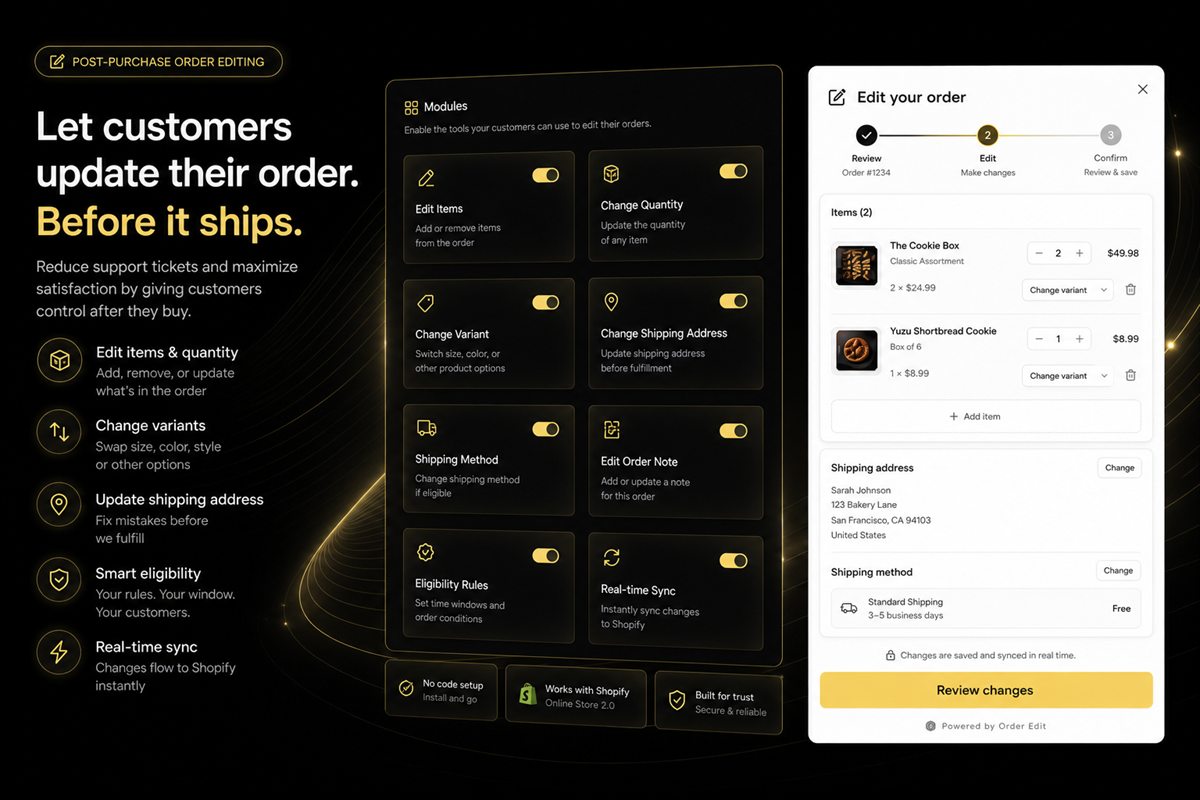
Key takeaways
- Address changes, variant swaps and quantity changes make up the large majority of post-purchase edit requests, and all three are safe to automate before fulfilment.
- Every edit handled by the customer is a support ticket that never gets written, and often a cancellation that never happens.
- The edit window must close at fulfilment. Allowing changes after a label is printed converts a cheap fix into an expensive one.
- The edit screen puts a warm, engaged buyer on a page you control, which makes it one of the highest-converting upsell surfaces in ecommerce.
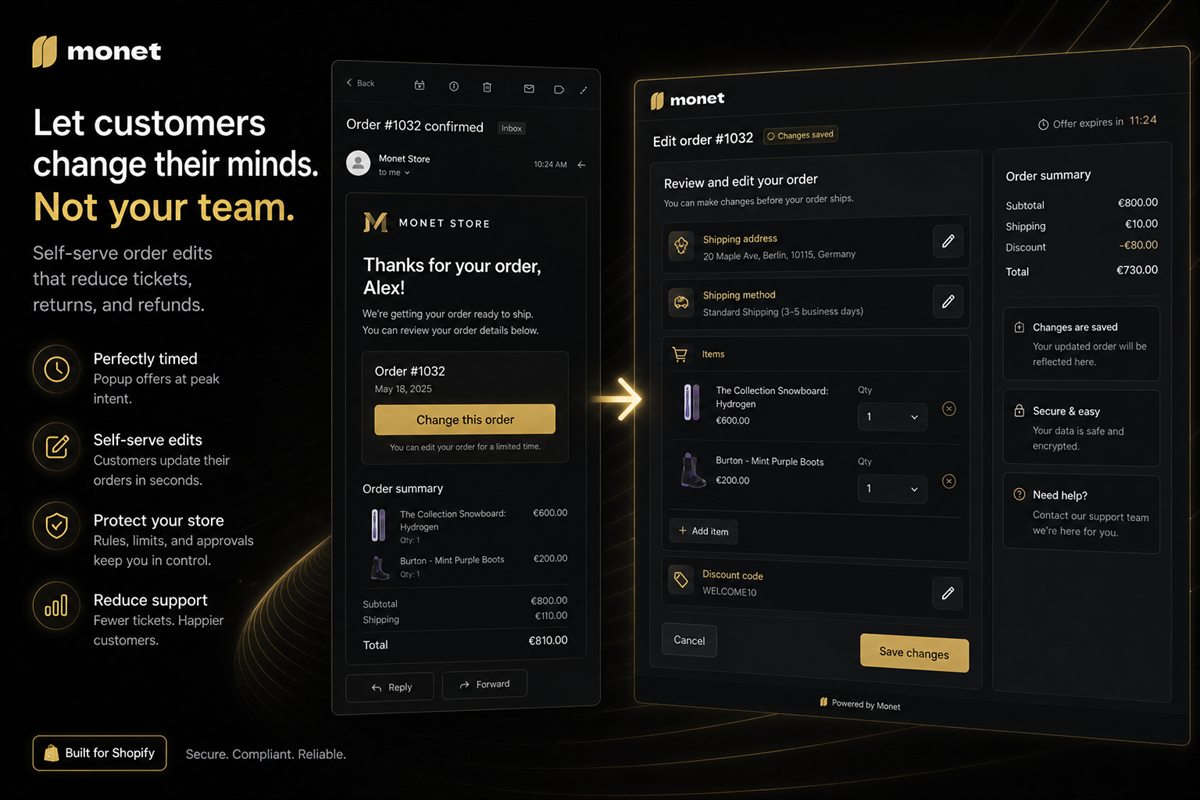
There is a window in every order between "payment confirmed" and "parcel dispatched". For most stores it lasts somewhere between a few hours and a couple of days, and almost nothing happens in it.
It is, in practice, the most operationally expensive window in the whole customer journey. It is where address corrections arrive, where "can I change the size" emails land, where cancellations are requested, and where a customer's minor mistake turns into a return you will pay for twice.
It is also, if you build for it, a revenue surface.
What customers actually want to change
The distribution is consistent across categories:
| Request | Share of post-purchase contacts | Safe to self-serve? |
|---|---|---|
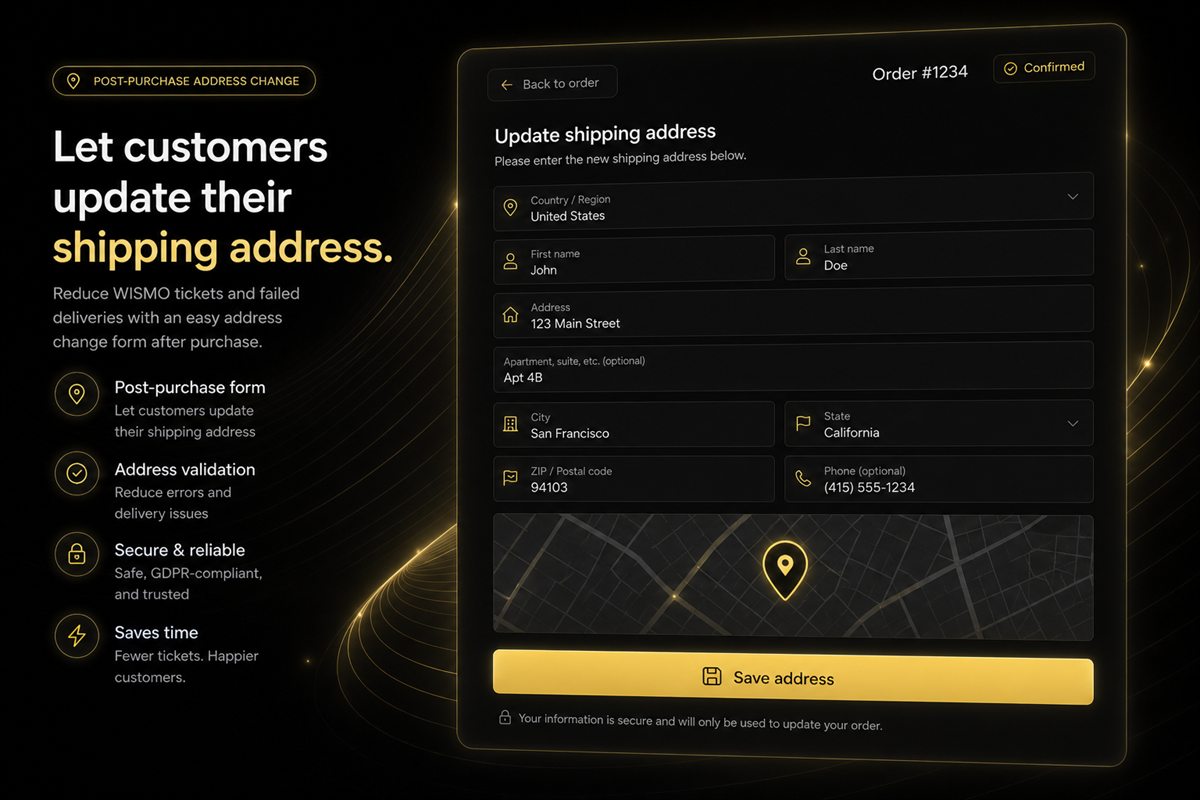
| Change shipping address | Largest single category | Yes, before fulfilment |
| Change size or variant | Large | Yes, same product |
| Change quantity | Moderate | Yes, with rules |
| Add an item | Moderate | Yes — and profitable |
| Remove an item | Moderate | With rules |
| Cancel entirely | Moderate | Deflect first |
| Change shipping method | Smaller | With rules |
| Update contact details | Smaller | Yes |
The top four are the bulk of the volume, and all four are safe to automate before fulfilment. That is the case for building this: a majority of your post-purchase support load is a form.
Why Shopify does not do this natively
Shopify lets a merchant edit orders from the admin. It does not provide a customer-facing self-service interface for the same operations.
That is a defensible product decision — order editing touches inventory, payment authorisation, fulfilment status, tax calculation and discount logic all at once, and getting it wrong creates real financial mess. But it means the gap is filled by support staff doing manual admin work, which is the most expensive possible way to handle a high-volume, low-complexity request.
Edits ranked by risk
Low risk — enable by default
Shipping address. Highest volume, lowest risk before a label is printed. The only real consideration is whether the new address changes the shipping zone or rate; if it does, either recalculate or restrict cross-zone changes.
Variant swap within the same product. Size or colour changes at the same price are a stock movement and nothing else. Check availability of the target variant, release the original.
Contact details. No commercial implications at all.
Adding items. Genuinely profitable, and the reason this whole feature has an ROI beyond cost saving. Requires collecting additional payment, which Shopify supports through order editing.
Medium risk — enable with rules
Quantity increase. Straightforward, needs a stock check and additional payment.
Quantity decrease. Needs a rule for what happens to threshold-based rewards. If the order drops below the free shipping threshold, do you charge shipping retroactively? Usually not worth the friction — but decide it explicitly.
Removing an item. Same threshold question, plus the bundle question: if the removed item was part of a discounted set, does the discount survive? It should not, and the recalculation needs to be visible to the customer before they confirm.
Shipping method change. Fine if it is an upgrade the customer pays for. Downgrades after the fact are usually not worth allowing.
High risk — restrict or handle manually
Cross-product swaps. Different product entirely, different price, different tax treatment. Effectively a cancel-and-reorder, and cleaner to handle that way.
Currency or market changes. Do not allow. The order was placed under a specific market's pricing, tax and duty configuration.
Anything after fulfilment. The window must close.
The window must close at fulfilment
This is the single most important rule.
Before fulfilment, an edit is a database change. After fulfilment, it is a warehouse operation — retrieving a picked order, voiding a label, repacking, re-dispatching — or, worse, an intercept request to a carrier.
Closing the window automatically at fulfilment is what keeps this feature cheap. It should not be a policy that support enforces; it should be a state the interface reflects. When an order is fulfilled, the edit options simply are not there.
For stores with same-day dispatch this window can be very short. That is fine — a two-hour window still catches a large share of the mistakes, because most people notice a wrong address within minutes of receiving the confirmation email.
Rules worth having
Self-service does not mean unrestricted. The controls that matter:
- By fulfilment status. The hard gate.
- By time since order. A secondary limit for stores with slow fulfilment, so an order placed three weeks ago is not still editable.
- By country. Some markets have customs or duty implications that make address changes genuinely risky.
- By customer tag. Wholesale and B2B accounts often need different rules — or no self-service at all.
- By order value. High-value orders may warrant a manual review step.
- By edit type. Allow address changes everywhere, restrict item swaps to domestic orders only, and so on.
The edit screen as a revenue surface
Here is the part that turns a cost-saving feature into a growth one.
Think about who is on that page. Someone who has already paid. Someone who is engaged enough to have come back and taken a deliberate action. Someone whose order has not shipped, which means adding an item costs you nothing extra in fulfilment — it goes in the same box.
That is a better prospect than almost any visitor on your storefront, and they are on a page you fully control.
What works there:
- "Forgot something?" with recommendations based on what they ordered. The framing is helpful rather than salesy, and it is true.
- Recently viewed items from before the purchase. They looked and did not buy; this is a second chance with zero friction.
- Free shipping top-up, if the order is below a threshold and they are now adding items anyway.
- Replenishment suggestions for consumables they have bought before.
The conversion rates on this surface are unusually high, for the simple reason that every friction point normally standing between a shopper and an additional purchase has already been cleared.
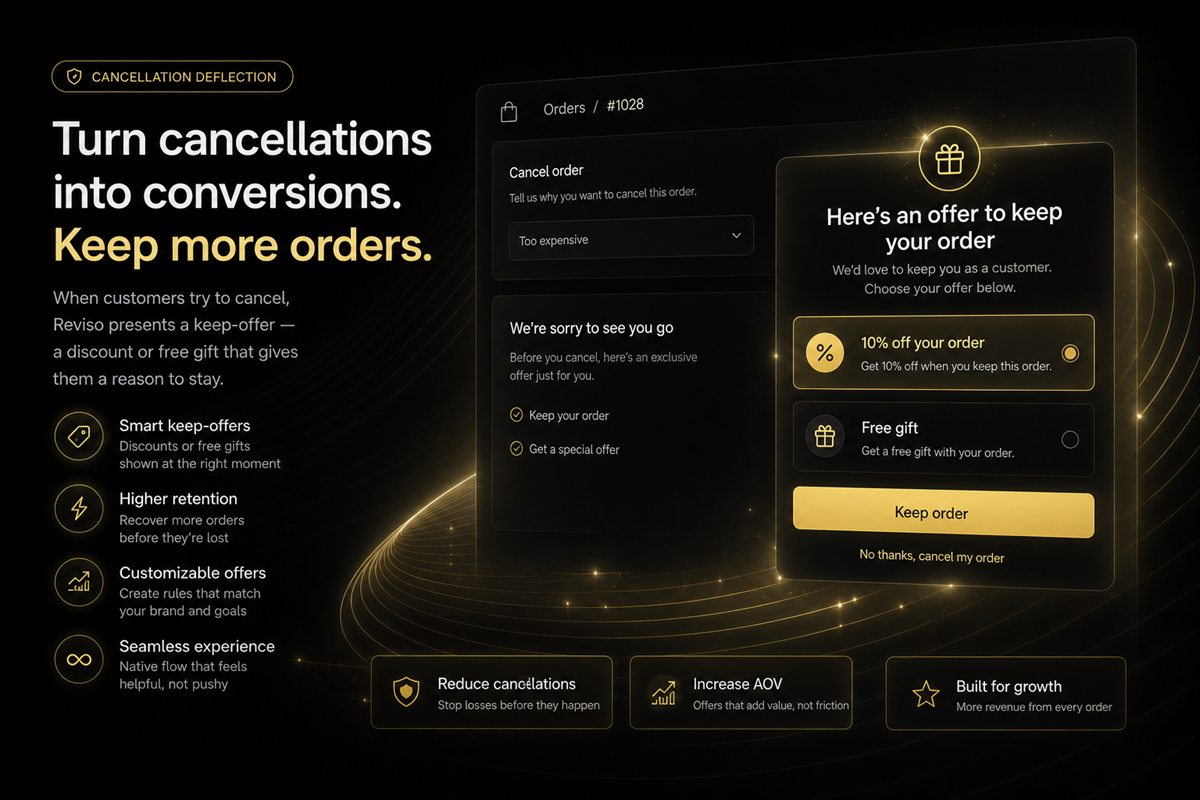
Cancellation deflection
A specific and valuable case. When a customer starts a cancellation, you have one interaction to understand why and offer an alternative.
The sequence that works:
- Ask the reason. A short list — changed my mind, wrong item, found it cheaper, taking too long, ordered by mistake.
- Respond to the reason. Wrong item → offer the edit flow instead. Taking too long → show the actual delivery estimate. Changed my mind → offer an incentive.
- Make cancelling easy if they still want to. A deflection flow that traps people produces chargebacks and reviews, which cost more than the order.
A saved order is worth substantially more than a refunded one, and a reason code is worth having regardless of the outcome. Over a few months, the reason distribution is one of the most useful datasets in the business.
Rollout
- Address changes only, before fulfilment. Measure the drop in support contacts.
- Add variant swaps within the same product.
- Add quantity changes with a threshold rule.
- Add the item-adding flow with recommendations. This is where revenue starts.
- Add cancellation deflection with reason capture.
- Layer in rules by country, tag and order value once the base flows are stable.
Do not build all six at once. The first step alone typically removes a large fraction of post-purchase support volume, and it is the one with essentially no downside.
Measuring it
- Post-purchase support contacts per 100 orders, before and after. The primary cost metric.
- Self-service edit rate — orders edited by the customer ÷ orders eligible.
- Cancellation rate, and the deflection rate within it.
- Return rate for avoidable reasons — wrong size, wrong item, wrong address. This is the slow one; expect it to move over a quarter rather than a month.
- Revenue per edit session. The upside metric.
- Fulfilment exceptions caused by edits. The guardrail. If warehouse errors rise after launch, the window is closing too late.
Frequently asked questions
Can customers edit their Shopify order after checkout?
Not natively in a self-service way. Shopify lets merchants edit orders from the admin, but there is no built-in customer-facing interface for changing an address, swapping a variant or adjusting quantities. That gap is why most stores handle these requests manually through support.
What order edits are safe to allow?
Shipping address, item quantity, variant swap within the same product and adding items are all safe before fulfilment because none of them change the fundamental commercial terms. Removing items and changing shipping method need rules attached because both can affect thresholds and margin.
When should the edit window close?
At fulfilment. Once a label is printed or an item is picked, an edit stops being a database change and becomes a warehouse operation. Closing the window automatically at that point is what keeps the feature cheap to run.
Does order editing reduce support tickets?
Substantially. Address changes and wrong-variant corrections are among the highest-volume post-purchase contacts for most stores, and both are entirely self-serviceable. Stores that enable self-service editing typically see a marked drop in post-purchase contact volume within weeks.
Can order editing reduce returns?
Yes, for the category of returns that begin as a mistake at checkout rather than a problem with the product. A customer who ordered the wrong size and can fix it before dispatch never generates a return, which removes the outbound shipping, the return shipping, the restocking and the refund processing.