Addy
Addy  Addly
Addly  Goalify
  Monet
Monet  Reviso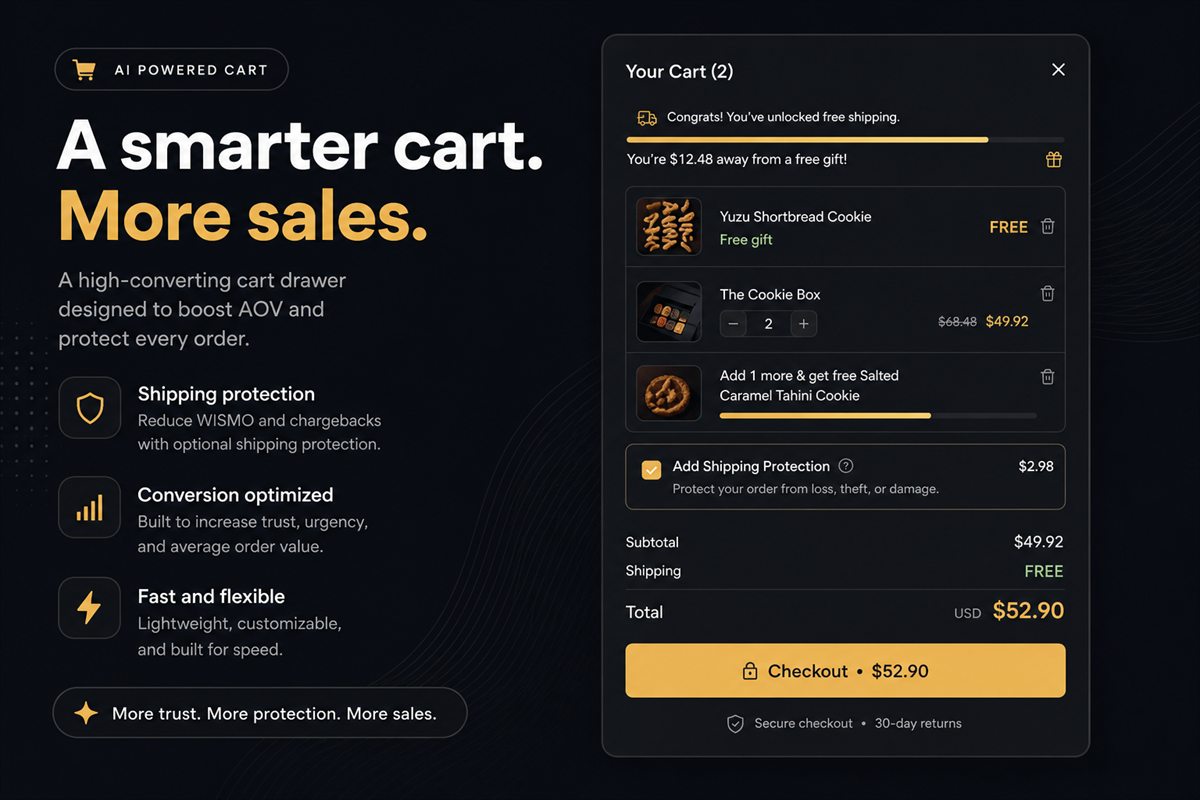
Key takeaways
- Shipping protection is an add-on, not a tax. Pre-ticked boxes convert and then generate chargebacks and support tickets.
- Put it below the line items and above checkout, with a one-line explanation of what it covers. Do not bury it in a modal.
- Price it as a small, round number relative to the order, with a floor so tiny orders are not charged pocket change of friction.
- It lifts AOV only when the shopper believes the store might actually use it. Vague "package protection" copy fails; specific cover works.
- If you will not make a missing parcel whole this week, do not sell the add-on.
Shipping protection in the Shopify cart helps when it is an optional add-on with specific cover — loss, theft, damage — and a toggle that starts off. It annoys when it is a pre-ticked fee the shopper did not notice. You can raise average order value without asking anyone to want another product. You can also make two dollars and spend twenty in goodwill.
The failure mode is familiar: a pre-ticked box, a small extra line, and a support ticket three days later. That is a tax, not an offer.
What shipping protection is
Shipping protection is a paid promise attached to this shipment: if the parcel is lost, stolen or damaged, the shopper will not have to fight a carrier. It is an add-on, like gift wrap, not a shipping rate and not a tax.
It is not "peace of mind." Peace of mind is a slogan. The product is three named outcomes and a process you will actually run.
Treat it with the same honesty you would use for any other product add-on. Optional, explained, removable in one tap.
What shoppers think they are buying
They are not buying a vibe. They are buying a specific promise. If your copy cannot name loss, theft and damage, do not sell the add-on.
Specific cover converts. "Package protection" does not, because it sounds like a fee with a slogan attached.
Write one sentence. "Covers loss, theft and damage on this shipment. If something happens, we replace or refund — you do not chase the carrier." If you cannot stand behind that sentence this week, the add-on is a conversion trick, and conversion tricks get refunded in reviews.
Where it belongs in the cart
Below the line items, above the checkout button, never inside a nested accordion. The shopper should see:
- What it is.
- What it costs.
- A toggle that is off by default.
A cart drawer is the right surface. The shopper is looking at the order they are about to pay for; an add-on that attaches to this shipment is easier to evaluate than one on a product page they have already left.
Do not bury it in a modal that opens after checkout click. That is how optional becomes accidental. Do not place it above the line items, where it competes with a progress bar. It is not a goal. It is a line item the shopper may add.
Pricing that does not feel like a tax
A useful starting range is a small percentage of subtotal, with a floor so a tiny order is not paying a large share of its value as "protection", and a ceiling so a large order is not paying a sticker price that looks like a second shipping rate. Round numbers beat odd cents.
Worked example: say the basket is $60. A round $1.49 or $1.99 is easier to accept than $1.37. Say the basket is $12. A floor around a pound or a dollar still has to be optional — and if that floor is a large slice of the order, consider not offering protection below a subtotal at all.
If you cannot explain the price in one sentence ("covers loss, theft and damage on this shipment"), the price is wrong or the product is.
A percentage tracks the risk. A flat fee is easier to understand. Many stores do better with a small flat fee on low AOVs and a capped percentage above a threshold. Pick one structure and show the number next to the toggle, not after they reach checkout.
How to offer it without a dark pattern
- Default the toggle off.
- Put the price in the same row as the label.
- Name what is covered in one line under the label.
- Let them remove it in one tap. The checkout total should update immediately.
- Do not re-check it if they open the drawer again.
The test is whether a reasonable shopper notices they added it and could remove it in one tap. Pre-checking fails that test. So does a tiny checkbox with no price until the last step.
If you need a third-party insurer to pay claims, use one, or you are self-insuring. Do not sell cover you cannot honour. That is both a legal problem and a review-bomb waiting to happen.
When not to offer shipping protection
Skip it when:
- You will not make the shopper whole without a long email thread
- Carriers already include a process you honour quickly, and the add-on would duplicate it
- The average parcel is so cheap that the floor fee looks like a tax
- You ship only local hand-delivery or pickup, where "lost in transit" is the wrong product
Used honestly, protection is a small AOV lift and a quieter support queue — the anxious shoppers who take it are the ones you want to reassure before checkout. Used as a pre-ticked fee, it is a tax. Shopify shoppers have learned to tell the difference.
How to measure it
Watch take rate, refunds and tickets that mention the fee, not only the extra revenue. An add-on that lifts AOV while filling the inbox is not a win. Pair it with the rest of the in-cart offer stack so protection is not the only extra line fighting the checkout button.
Frequently asked questions
Is shipping protection a dark pattern?
Pre-checking it is. Offering it, clearly, with an opt-in, is not. The test is whether a reasonable shopper notices they added it and could remove it in one tap.
Should protection be a percentage or a flat fee?
A percentage tracks the risk; a flat fee is easier to understand. Many stores do better with a small flat fee on low AOVs and a capped percentage above a threshold.
Will it hurt conversion?
A forced add-on will. A clearly optional line with a short benefit statement usually does not, and the shoppers who take it are the ones most anxious about delivery — exactly the group you want to reassure before checkout.
Do I need a third-party insurer?
If you are going to pay claims, yes, or you are self-insuring. Do not sell cover you cannot honour. That is both a legal problem and a review-bomb waiting to happen.
Where should shipping protection sit in a cart drawer?
Below the line items and above the checkout button, never inside a nested accordion or a modal. The shopper should see what it is, what it costs, and a toggle that is off by default.
Can I offer protection on the product page instead?
You can, but the cart is the better surface. The shopper is looking at the order they are about to pay for, so an add-on that attaches to this shipment is easier to evaluate than one on a product page they have already left.