Addy
Addy  Addly
Addly  Goalify
  Monet
Monet  Reviso
  Rankly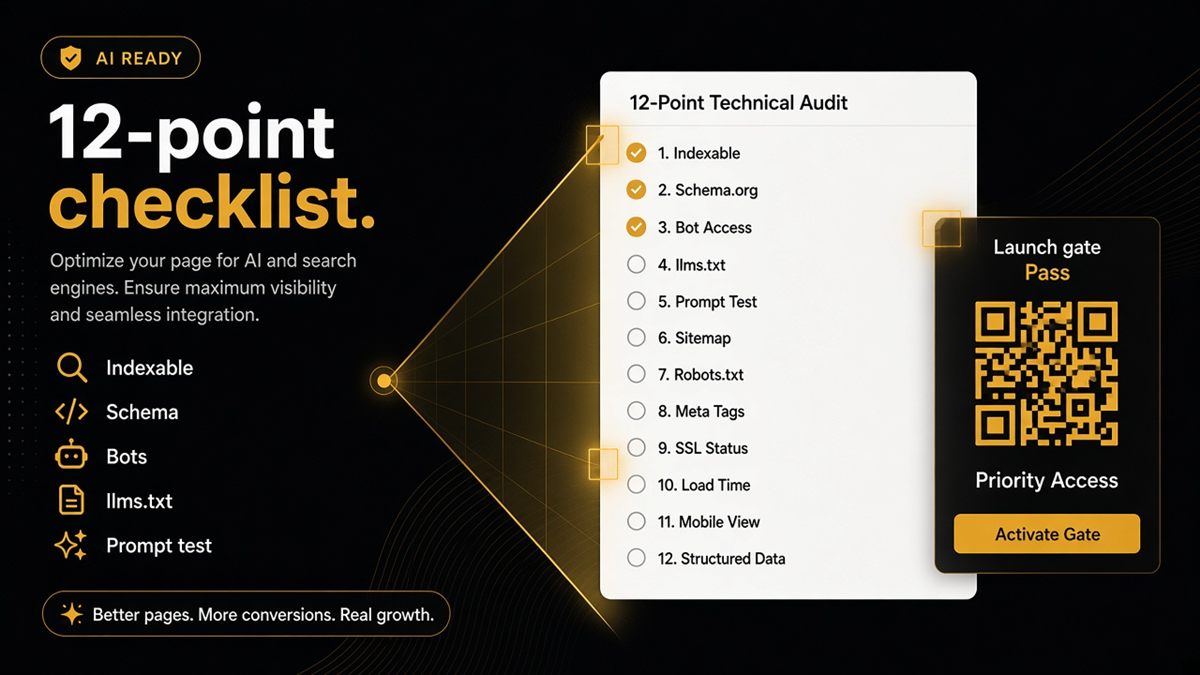
Key takeaways
- Use a fixed 12-point checklist so theme changes cannot silently break AI readability.
- Cover the homepage, one collection, one product and one policy page every quarter.
- Fix technical rows first (noindex, blocked bots, missing price markup); polish content second.
- Verify on live URLs with view-source, the Rich Results Test and Search Console, not in the theme editor.
- Automate checks 1–11 with the free ChatGPT SEO check for Shopify stores, then do check 12 by hand.
A Shopify AI readiness checklist is a fixed set of 12 checks that confirm ChatGPT, Perplexity and Google AI Overviews can fetch, understand and quote your store. Run it on four representative URLs — homepage, one collection, one product and one policy page — before you scale ad spend or ship a theme update. Printable beats memorable: a list you run every quarter catches breakage that memory never will.
What is AI readiness for a Shopify store?
AI readiness means a public page exposes clean, machine-readable facts that an AI model can use without guessing. For an online store that comes down to four things: the page can be fetched (not password-gated, not marked noindex), the page is described in structured data (JSON-LD — a small hidden block of code that labels the shop name, product, price and stock in a format machines read reliably), the crawlers you want are allowed in robots.txt, and an optional llms.txt file at your domain root points models at the pages that matter.
It is not a ranking score and it is not a guarantee of citations. It is the minimum condition for being quoted accurately rather than invented.
Why run a checklist before you scale?
Theme updates, SEO app installs and catalogue relaunches all change what a crawler sees, and none of them show a warning in Shopify admin. A collection you are about to put $5,000 of ads behind may be marked noindex by a forgotten app setting. A product page may show one price to shoppers and an old price in JSON-LD. A checklist forces the same questions on the same page types every time, so the answer is "we checked" rather than "we assumed."
The 12 Shopify AI readiness checks
Each check has a merchant-level test you can do yourself.
- Production store is not password-gated. Open the store in an incognito window. If you see the password page, crawlers do too.
- Key pages are not noindex. View page source and search for
noindex. Also check Search Console → Pages for "Excluded by noindex tag." - Canonicals point at the right page type. A product's canonical should be
/products/handle, not a collection-scoped copy. See canonical URLs on Shopify. - og:title and og:image are present. Search the source for
og:title. Paste the URL into a Slack or WhatsApp message and confirm a preview appears. - Homepage carries Organization or WebSite markup. Search the homepage source for
"@type": "Organization"or"WebSite". - Products carry an Offer with price and availability. Paste the product URL into Google's Rich Results Test and confirm a Product result with price and availability.
- Collections are marked as collections with product links. The HTML should include real product anchors, not only an infinite-scroll placeholder.
- Breadcrumbs exist where you would expect them. Visible trail plus BreadcrumbList in the source.
- Names agree across H1, og:title and JSON-LD. Three different product names make a model hedge.
- AI bot policy is intentional in robots.txt. Open
/robots.txtand confirm GPTBot, ClaudeBot, PerplexityBot and Google-Extended are allowed or disallowed on purpose. See GPTBot and robots.txt on Shopify. - llms.txt is live and useful. Open
/llms.txt. It should return short text with links, not a 404 or a theme page. - A prompt test in ChatGPT matches reality. Ask "What does [store] sell and what does [product] cost?" and compare the answer to the live page.
How do I run the checklist on a Shopify store?
- Pick four URLs: homepage, your highest-traffic collection, your best-selling product and your shipping or returns policy page.
- Open each in an incognito window and note the visible name, price and stock state.
- Right-click → View page source and search for
ld+json,noindex,canonicalandog:title. - Paste each URL into Google's Rich Results Test and note any missing fields.
- Open
/robots.txtand/llms.txton your domain. - Run checks 1–11 via the SEO & AI Audit — the free ChatGPT SEO check for Shopify stores — on the same four URLs, and do check 12 manually with the ask buttons.
- Record pass/fail in one sheet with the date and theme version.
Where the fixes live in Shopify
Most structured data lives in your theme code: Online Store → Themes → ⋯ → Edit code, then a snippet or section file with json or schema in the name. robots.txt is edited through a robots.txt.liquid template in the same editor. Store name and contact details come from Settings → Store details. Password protection is under Online Store → Preferences.
Worked example: a fashion store before a Black Friday push
Say a store plans to put ad budget behind /collections/winter-coats. The checklist run shows: check 2 fails (an SEO app added noindex to the collection during a test), check 6 passes on the hero coat, check 8 fails (the theme has no breadcrumbs), check 11 fails (no llms.txt). The noindex is a P0 and gets fixed the same afternoon in the app settings. Breadcrumbs go on the theme partner's list for next week. llms.txt is a 20-minute job for marketing. Ads start once check 2 is confirmed fixed in view-source — not once someone "thinks" it is.
How should I triage failed checks?
| Priority | Fails | Action |
|---|---|---|
| P0 | noindex on key pages, bots blocked that you wanted open, missing product price in markup | Fix before spending a pound on ads |
| P1 | llms.txt missing, breadcrumbs missing, names disagree | Schedule this sprint |
| P2 | FAQ markup, SearchAction, extra Organization fields | Nice to have; batch with next theme work |
What are the most common mistakes?
- Checking in the theme editor preview instead of the live URL. Apps and customisations only show up live.
- Fixing one product and assuming all products are fixed. Templates differ; check a product on each template.
- Blocking every bot "for safety" and then wondering why AI tools describe the brand from third-party sites.
- Adding review markup when reviews are not shown on the page.
How often should I re-run it?
Quarterly for the full pass. Ad hoc after theme updates, SEO app changes, or a catalogue relaunch. If a check fails twice in a row for the same reason, the fix is not the checklist item — it is the process that keeps breaking it.
Checklists beat memory. Tape this one next to your launch runbook and refuse to scale spend on a URL that has not passed.
Frequently asked questions
What is a Shopify AI readiness checklist?
It is a fixed list of technical and content checks that confirm AI tools such as ChatGPT, Perplexity and Google AI Overviews can fetch, read and quote your Shopify pages. It covers indexability, structured data, robots.txt bot rules, llms.txt, previews and a live prompt test. Running it on four representative URLs takes under an hour.
Who should own the AI readiness checklist in a Shopify business?
Marketing usually schedules the run and owns the prompt tests, a developer or theme partner clears the technical fails, and the founder decides the bot policy in robots.txt. Keep one shared results sheet so nobody argues about what passed.
How long does a full checklist pass take?
About 30 to 45 minutes for four URLs once you have done it once. The first run takes longer because you will be locating where your theme emits JSON-LD and confirming how your robots.txt is configured.
Do password-protected Shopify stores fail every check?
A password-protected storefront is not publicly readable, so public crawlers and AI bots see only the password page. Checks can still be run with the storefront password before launch, but nothing counts as AI-ready until the password is removed.
How do I check my Shopify store's structured data without a developer?
Open the live page, right-click and choose View page source, then search for application/ld+json to see the raw JSON-LD. Paste the same URL into Google's Rich Results Test for a readable summary, or run the free ChatGPT SEO check for Shopify stores for a merchant-language pass/fail list.
How often should I re-run the checklist?
Do a full pass every quarter and a targeted pass after any theme update, SEO app install or removal, or a large catalogue relaunch. Those three events are the most common causes of silent breakage.
Is blocking AI bots in robots.txt a legal decision?
The checklist treats it as an operational choice, not legal advice. Decide deliberately whether GPTBot, ClaudeBot, PerplexityBot and Google-Extended may fetch your pages, then make robots.txt match. Speak to counsel if you need policy wording.